> ## Documentation Index
> Fetch the complete documentation index at: https://www.cometchat.com/docs/llms.txt
> Use this file to discover all available pages before exploring further.
# Outgoing Call
> Full-screen outgoing call UI with recipient avatar, name, call status, and end-call button.
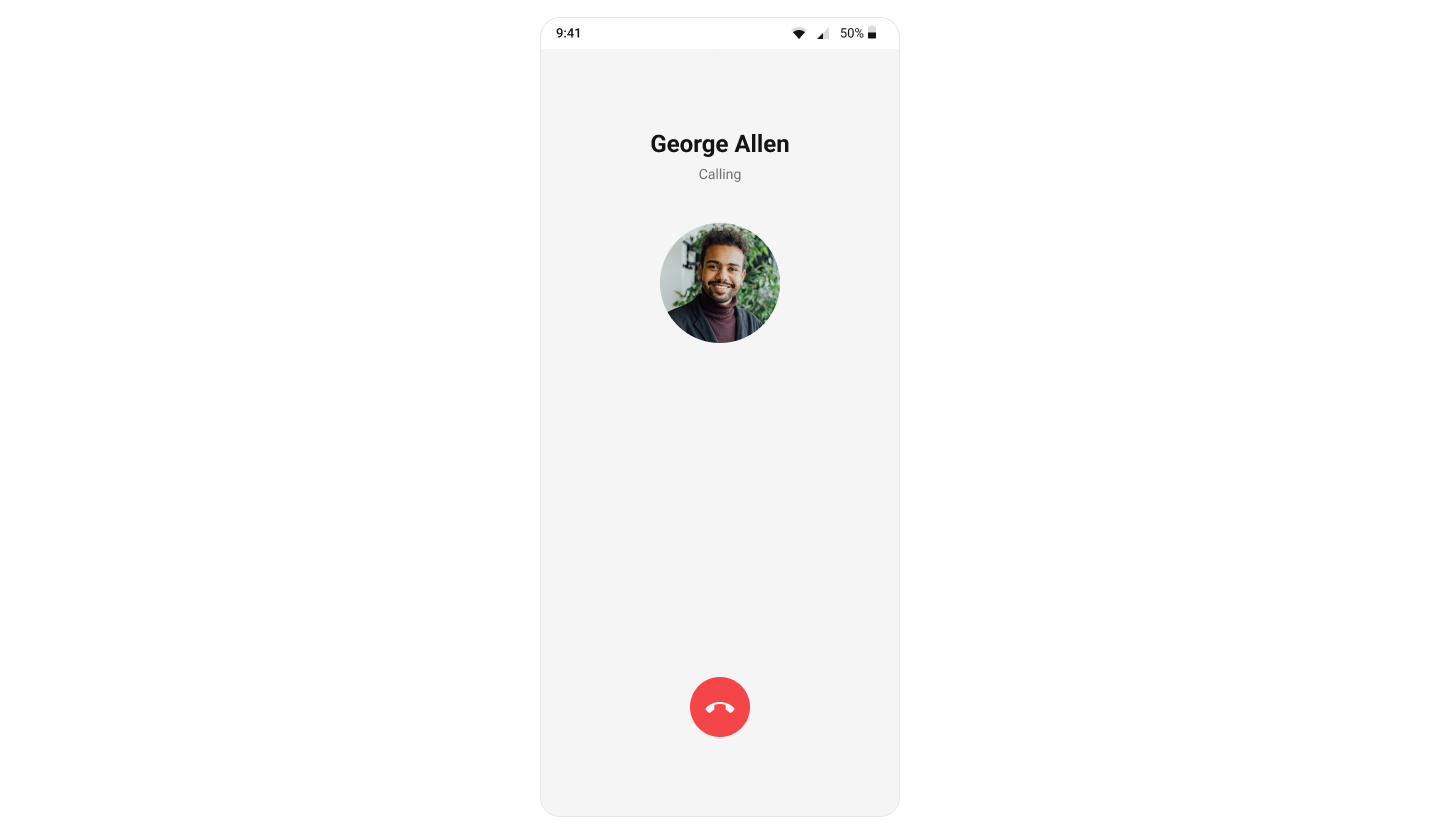
`CometChatOutgoingCall` renders the outgoing call screen and transitions to the ongoing call screen when the receiver accepts. It displays the recipient's avatar, name, call status, and an end-call button.
 ***
## Where It Fits
`CometChatOutgoingCall` is a call-initiation component. Wire it to `CometChatCallEvents` to handle call-accepted and call-rejected transitions.
```xml activity_call.xml lines theme={null}
```
```kotlin lines theme={null}
val outgoingCall = findViewById(R.id.outgoing_call)
outgoingCall.setCall(call)
```
```kotlin lines theme={null}
CometChatOutgoingCall(
call = call
)
```
***
## Quick Start
Add to your layout XML:
```xml lines theme={null}
```
Set the `Call` object — this is required:
```kotlin lines theme={null}
override fun onCreate(savedInstanceState: Bundle?) {
super.onCreate(savedInstanceState)
setContentView(R.layout.activity_call)
val outgoingCall = findViewById(R.id.outgoing_call)
outgoingCall.setCall(call)
}
```
```kotlin lines theme={null}
@Composable
fun OutgoingCallScreen() {
CometChatOutgoingCall(
call = call
)
}
```
Prerequisites: CometChat SDK initialized with `CometChatUIKit.init()`, a user logged in, and the UI Kit dependency added.
***
## Actions and Events
### Callback Methods
#### `onEndCallClick`
Fires when the end-call button is tapped. Default: cancels the outgoing call via the SDK.
```kotlin lines theme={null}
outgoingCall.setOnEndCallClick {
// Custom end-call logic
}
```
```kotlin lines theme={null}
CometChatOutgoingCall(
call = call,
onEndCallClick = { /* custom end-call logic */ }
)
```
#### `onError`
Fires on internal errors (network failure, auth issue, SDK exception).
```kotlin lines theme={null}
outgoingCall.setOnError { context, exception ->
Log.e("OutgoingCall", "Error: ${exception.message}")
}
```
```kotlin lines theme={null}
CometChatOutgoingCall(
call = call,
onError = { context, exception ->
Log.e("OutgoingCall", "Error: ${exception.message}")
}
)
```
### Global UI Events (CometChatCallEvents)
| Event | Fires when | Payload |
| ---------------- | ---------------------------------- | ------- |
| `ccCallAccepted` | Outgoing call accepted by receiver | `Call` |
| `ccCallRejected` | Outgoing call rejected by receiver | `Call` |
### SDK Events (Real-Time, Automatic)
| SDK Listener | Internal behavior |
| ------------------------ | --------------------------------------------------- |
| `onOutgoingCallAccepted` | Transitions to the ongoing call screen |
| `onOutgoingCallRejected` | Finishes the activity or invokes back-press handler |
***
## Functionality
| Method (Kotlin XML) | Compose Parameter | Description |
| ------------------------------------ | ---------------------------------- | --------------------------------- |
| `setCall(call)` | `call = call` | Set the Call object (required) |
| `setOnEndCallClick { }` | `onEndCallClick = { }` | Override end-call button behavior |
| `setOnError { }` | `onError = { }` | Error callback |
| `setDisableSoundForCalls(true)` | `disableSoundForCalls = true` | Disable outgoing call ringtone |
| `setCustomSoundForCalls(R.raw.tone)` | `customSoundForCalls = R.raw.tone` | Custom ringtone |
***
## Custom View Slots
### Title View
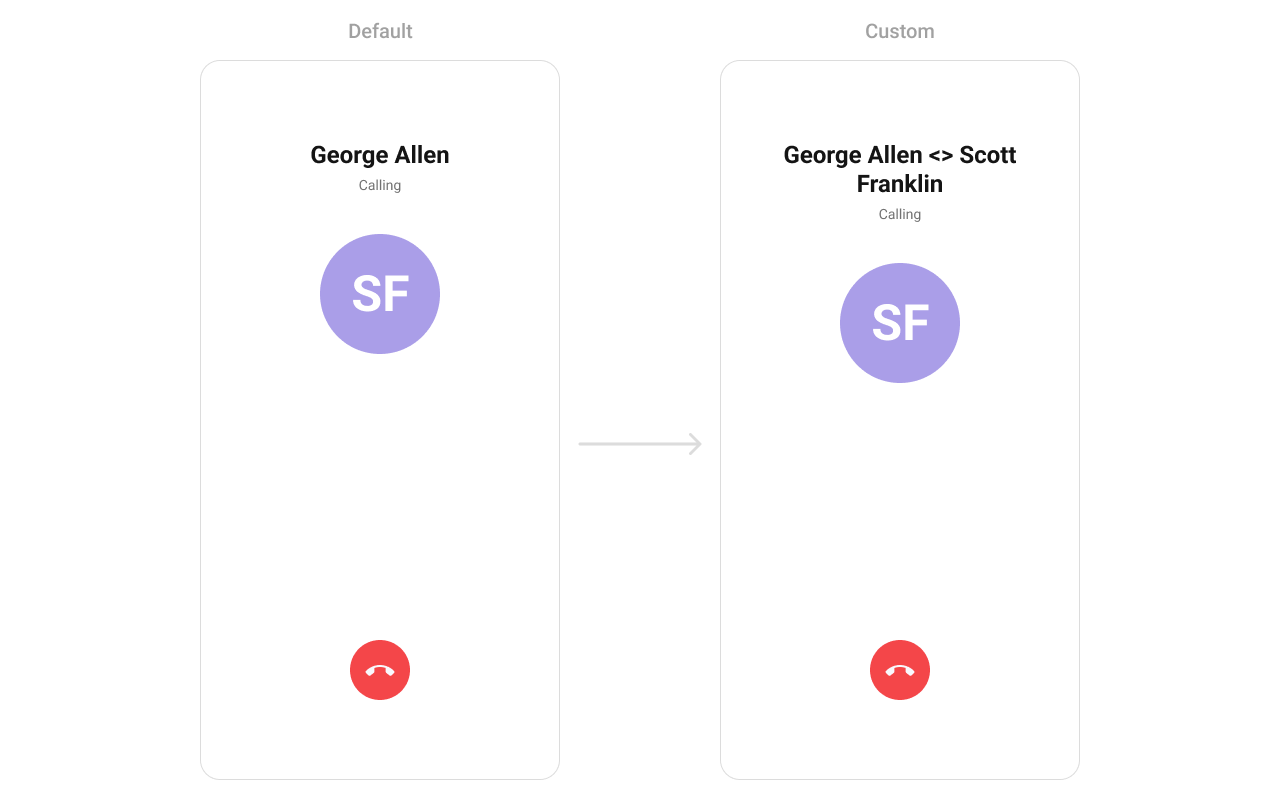
Replace the name / title text area.
***
## Where It Fits
`CometChatOutgoingCall` is a call-initiation component. Wire it to `CometChatCallEvents` to handle call-accepted and call-rejected transitions.
```xml activity_call.xml lines theme={null}
```
```kotlin lines theme={null}
val outgoingCall = findViewById(R.id.outgoing_call)
outgoingCall.setCall(call)
```
```kotlin lines theme={null}
CometChatOutgoingCall(
call = call
)
```
***
## Quick Start
Add to your layout XML:
```xml lines theme={null}
```
Set the `Call` object — this is required:
```kotlin lines theme={null}
override fun onCreate(savedInstanceState: Bundle?) {
super.onCreate(savedInstanceState)
setContentView(R.layout.activity_call)
val outgoingCall = findViewById(R.id.outgoing_call)
outgoingCall.setCall(call)
}
```
```kotlin lines theme={null}
@Composable
fun OutgoingCallScreen() {
CometChatOutgoingCall(
call = call
)
}
```
Prerequisites: CometChat SDK initialized with `CometChatUIKit.init()`, a user logged in, and the UI Kit dependency added.
***
## Actions and Events
### Callback Methods
#### `onEndCallClick`
Fires when the end-call button is tapped. Default: cancels the outgoing call via the SDK.
```kotlin lines theme={null}
outgoingCall.setOnEndCallClick {
// Custom end-call logic
}
```
```kotlin lines theme={null}
CometChatOutgoingCall(
call = call,
onEndCallClick = { /* custom end-call logic */ }
)
```
#### `onError`
Fires on internal errors (network failure, auth issue, SDK exception).
```kotlin lines theme={null}
outgoingCall.setOnError { context, exception ->
Log.e("OutgoingCall", "Error: ${exception.message}")
}
```
```kotlin lines theme={null}
CometChatOutgoingCall(
call = call,
onError = { context, exception ->
Log.e("OutgoingCall", "Error: ${exception.message}")
}
)
```
### Global UI Events (CometChatCallEvents)
| Event | Fires when | Payload |
| ---------------- | ---------------------------------- | ------- |
| `ccCallAccepted` | Outgoing call accepted by receiver | `Call` |
| `ccCallRejected` | Outgoing call rejected by receiver | `Call` |
### SDK Events (Real-Time, Automatic)
| SDK Listener | Internal behavior |
| ------------------------ | --------------------------------------------------- |
| `onOutgoingCallAccepted` | Transitions to the ongoing call screen |
| `onOutgoingCallRejected` | Finishes the activity or invokes back-press handler |
***
## Functionality
| Method (Kotlin XML) | Compose Parameter | Description |
| ------------------------------------ | ---------------------------------- | --------------------------------- |
| `setCall(call)` | `call = call` | Set the Call object (required) |
| `setOnEndCallClick { }` | `onEndCallClick = { }` | Override end-call button behavior |
| `setOnError { }` | `onError = { }` | Error callback |
| `setDisableSoundForCalls(true)` | `disableSoundForCalls = true` | Disable outgoing call ringtone |
| `setCustomSoundForCalls(R.raw.tone)` | `customSoundForCalls = R.raw.tone` | Custom ringtone |
***
## Custom View Slots
### Title View
Replace the name / title text area.
 ```kotlin lines theme={null}
outgoingCall.setTitleView { context, call ->
val titleView = LayoutInflater.from(context).inflate(R.layout.custom_title_view, null)
val tvTitle = titleView.findViewById(R.id.title_text)
val user = call?.callReceiver as User
tvTitle.text = user.name + " <> " + call.sender.uid
titleView
}
```
```kotlin lines theme={null}
CometChatOutgoingCall(
call = call,
titleView = { c ->
val receiver = c.callReceiver as? User
Text(
text = "${receiver?.name} <> ${c.sender.uid}",
style = CometChatTheme.typography.caption1Regular
)
}
)
```
### Avatar View
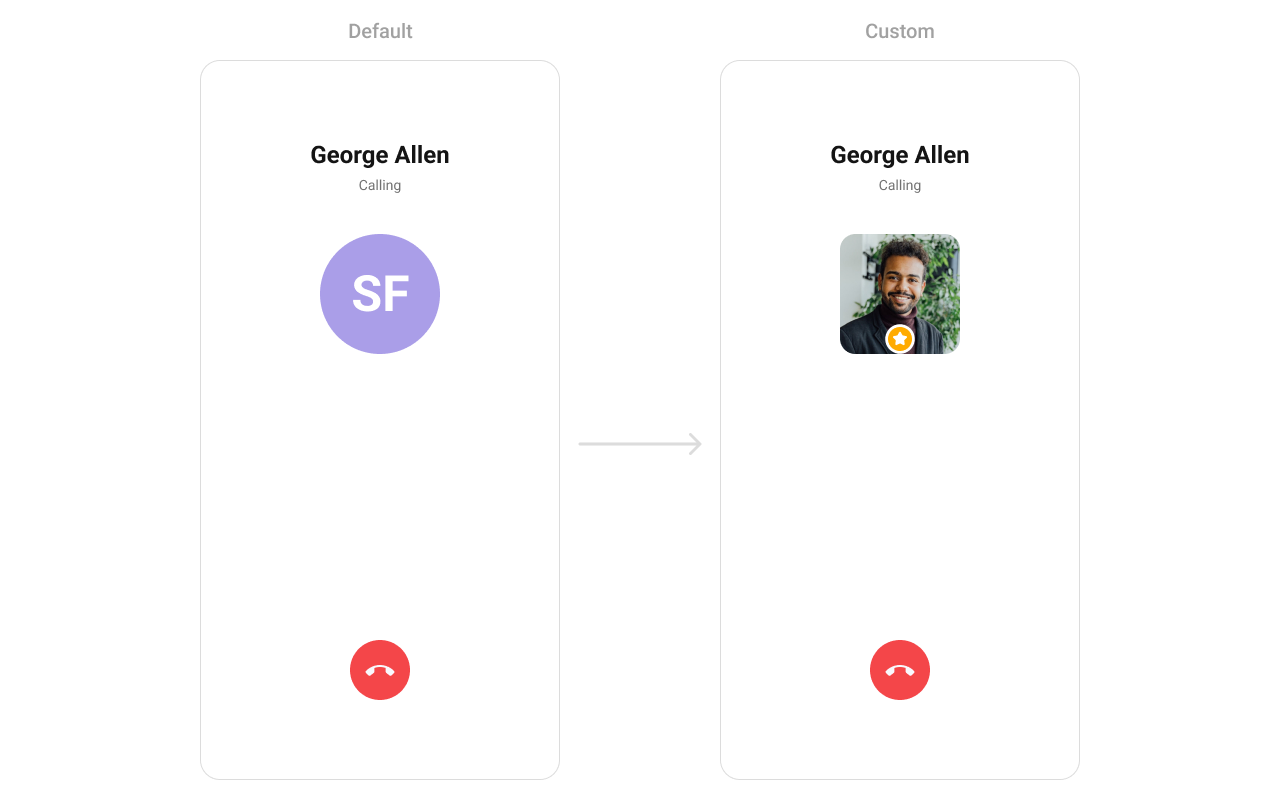
Replace the avatar / profile picture area.
```kotlin lines theme={null}
outgoingCall.setTitleView { context, call ->
val titleView = LayoutInflater.from(context).inflate(R.layout.custom_title_view, null)
val tvTitle = titleView.findViewById(R.id.title_text)
val user = call?.callReceiver as User
tvTitle.text = user.name + " <> " + call.sender.uid
titleView
}
```
```kotlin lines theme={null}
CometChatOutgoingCall(
call = call,
titleView = { c ->
val receiver = c.callReceiver as? User
Text(
text = "${receiver?.name} <> ${c.sender.uid}",
style = CometChatTheme.typography.caption1Regular
)
}
)
```
### Avatar View
Replace the avatar / profile picture area.
 ```kotlin lines theme={null}
outgoingCall.setAvatarView { context, call ->
val avatarView = LayoutInflater.from(context).inflate(R.layout.custom_avatar_view, null)
val avatar = avatarView.findViewById(R.id.avatar)
val user = call?.receiver as User
avatar.setAvatar(user.uid, user.avatar)
avatarView
}
```
```kotlin lines theme={null}
CometChatOutgoingCall(
call = call,
avatarView = { c ->
val receiver = c.callReceiver as? User
CometChatAvatar(
imageUrl = receiver?.avatar,
name = receiver?.name,
modifier = Modifier.size(100.dp)
)
}
)
```
### Cancel Button View
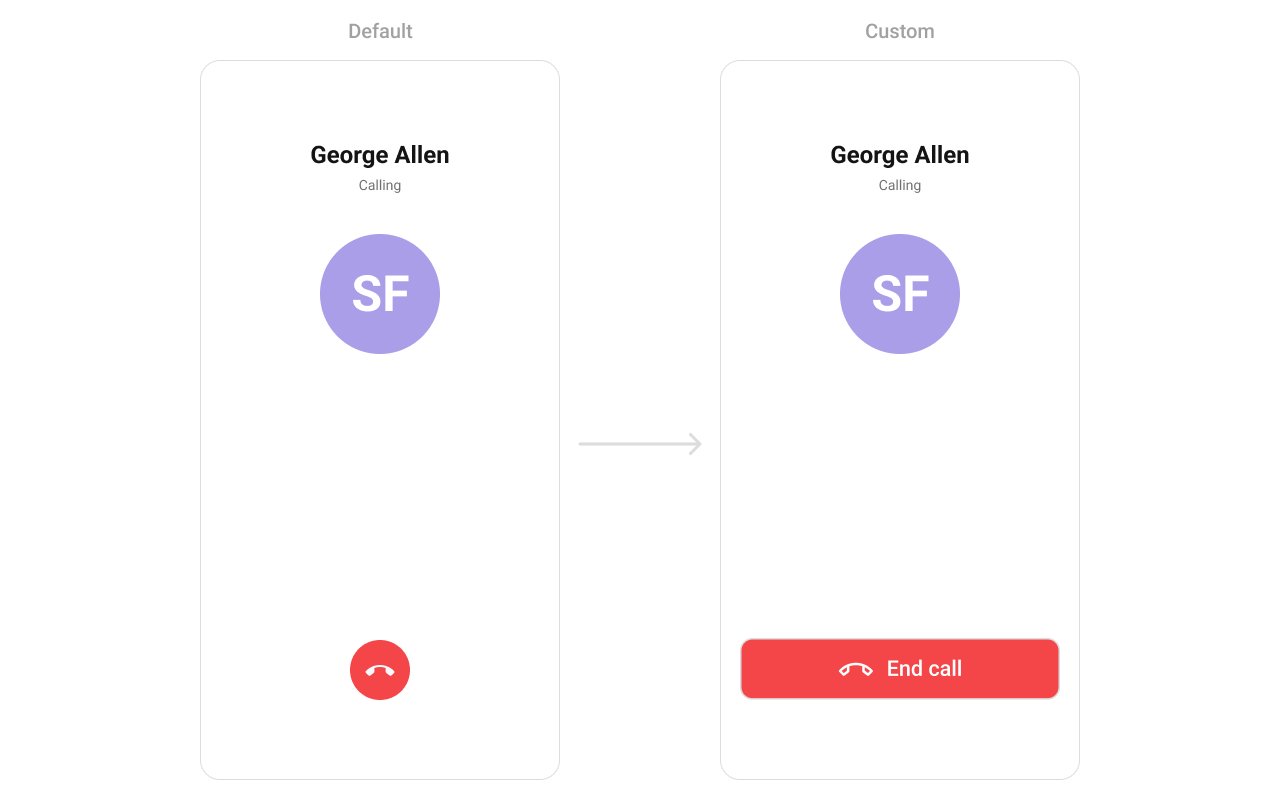
Replace the end-call button.
```kotlin lines theme={null}
outgoingCall.setAvatarView { context, call ->
val avatarView = LayoutInflater.from(context).inflate(R.layout.custom_avatar_view, null)
val avatar = avatarView.findViewById(R.id.avatar)
val user = call?.receiver as User
avatar.setAvatar(user.uid, user.avatar)
avatarView
}
```
```kotlin lines theme={null}
CometChatOutgoingCall(
call = call,
avatarView = { c ->
val receiver = c.callReceiver as? User
CometChatAvatar(
imageUrl = receiver?.avatar,
name = receiver?.name,
modifier = Modifier.size(100.dp)
)
}
)
```
### Cancel Button View
Replace the end-call button.
 ```kotlin lines theme={null}
outgoingCall.setEndCallView { context, call ->
val endCallView = LayoutInflater.from(context).inflate(R.layout.end_call_button, null)
endCallView.setOnClickListener {
Toast.makeText(context, "End call clicked", Toast.LENGTH_SHORT).show()
}
val layoutParams = LinearLayout.LayoutParams(
ViewGroup.LayoutParams.MATCH_PARENT,
ViewGroup.LayoutParams.WRAP_CONTENT
)
layoutParams.bottomMargin = Utils.convertDpToPx(context, 40)
endCallView.layoutParams = layoutParams
endCallView
}
```
```kotlin lines theme={null}
CometChatOutgoingCall(
call = call,
cancelButtonView = { c ->
Button(
onClick = { /* end call */ },
colors = ButtonDefaults.buttonColors(containerColor = Color.Red),
modifier = Modifier
.fillMaxWidth()
.padding(horizontal = 16.dp, vertical = 40.dp)
) {
Icon(painterResource(R.drawable.cometchat_ic_end_call), "End Call")
Spacer(Modifier.width(16.dp))
Text("End Call")
}
}
)
```
***
## Style
Define a custom style in `themes.xml`:
```xml themes.xml lines theme={null}
```
```kotlin lines theme={null}
outgoingCall.setStyle(R.style.CustomOutgoingCallStyle)
```
```kotlin lines theme={null}
CometChatOutgoingCall(
call = call,
style = CometChatOutgoingCallStyle.default().copy(
backgroundColor = Color(0xFFFEEDE1),
titleTextColor = Color(0xFFF76808),
subtitleTextColor = Color(0xFFF76808)
)
)
```
```kotlin lines theme={null}
outgoingCall.setEndCallView { context, call ->
val endCallView = LayoutInflater.from(context).inflate(R.layout.end_call_button, null)
endCallView.setOnClickListener {
Toast.makeText(context, "End call clicked", Toast.LENGTH_SHORT).show()
}
val layoutParams = LinearLayout.LayoutParams(
ViewGroup.LayoutParams.MATCH_PARENT,
ViewGroup.LayoutParams.WRAP_CONTENT
)
layoutParams.bottomMargin = Utils.convertDpToPx(context, 40)
endCallView.layoutParams = layoutParams
endCallView
}
```
```kotlin lines theme={null}
CometChatOutgoingCall(
call = call,
cancelButtonView = { c ->
Button(
onClick = { /* end call */ },
colors = ButtonDefaults.buttonColors(containerColor = Color.Red),
modifier = Modifier
.fillMaxWidth()
.padding(horizontal = 16.dp, vertical = 40.dp)
) {
Icon(painterResource(R.drawable.cometchat_ic_end_call), "End Call")
Spacer(Modifier.width(16.dp))
Text("End Call")
}
}
)
```
***
## Style
Define a custom style in `themes.xml`:
```xml themes.xml lines theme={null}
```
```kotlin lines theme={null}
outgoingCall.setStyle(R.style.CustomOutgoingCallStyle)
```
```kotlin lines theme={null}
CometChatOutgoingCall(
call = call,
style = CometChatOutgoingCallStyle.default().copy(
backgroundColor = Color(0xFFFEEDE1),
titleTextColor = Color(0xFFF76808),
subtitleTextColor = Color(0xFFF76808)
)
)
```
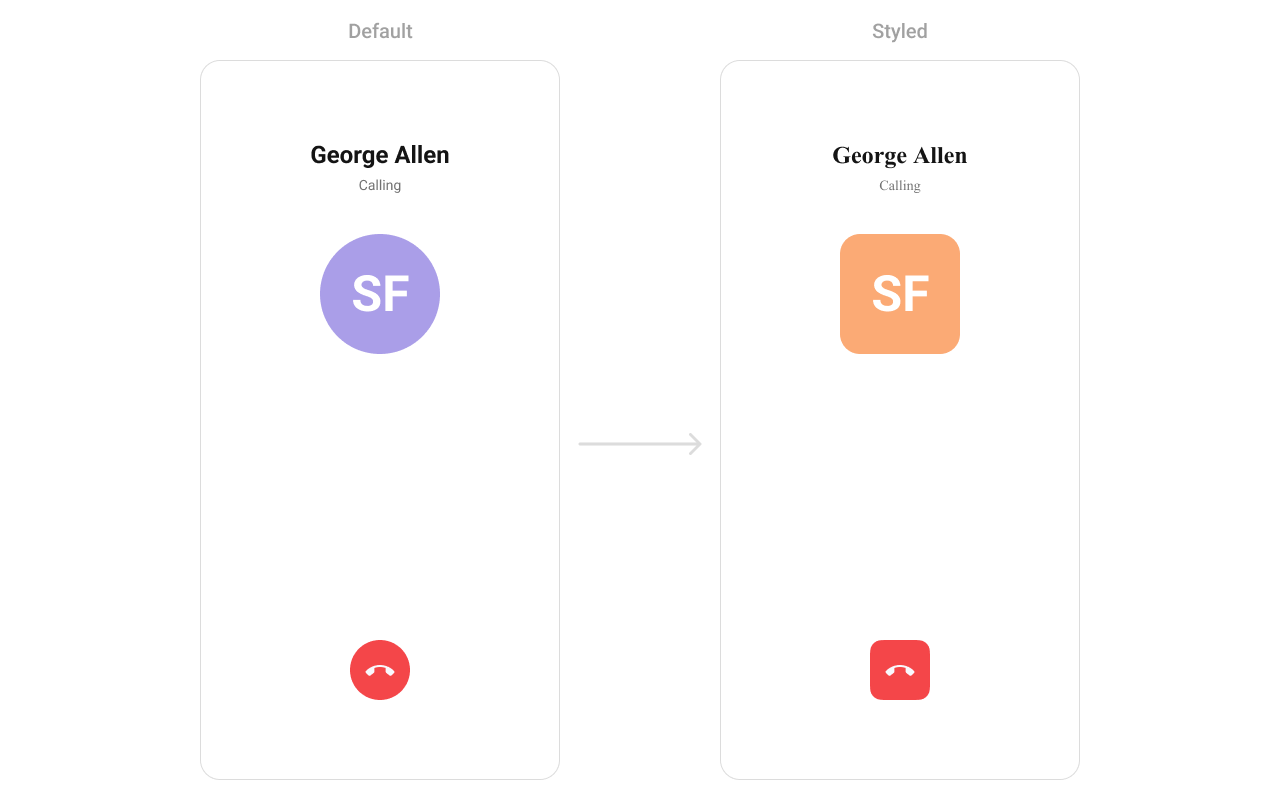 See [Component Styling](/ui-kit/android/v6/component-styling) for the full reference.
***
## Next Steps
Incoming call notification with accept/reject
Voice and video call buttons
View call history
Browse recent conversations
See [Component Styling](/ui-kit/android/v6/component-styling) for the full reference.
***
## Next Steps
Incoming call notification with accept/reject
Voice and video call buttons
View call history
Browse recent conversations