> ## Documentation Index
> Fetch the complete documentation index at: https://www.cometchat.com/docs/llms.txt
> Use this file to discover all available pages before exploring further.
# ShortCut Formatter
> Add shortcut text expansion to the message composer using CometChatTextFormatter and the message-shortcuts extension.
| Field | Value |
| --------------- | -------------------------------------------------------------------------------------------------------------------- |
| Packages | `com.cometchat:chatuikit-kotlin` · `com.cometchat:chatuikit-jetpack` |
| Key class | `ShortCutFormatter` (extends `CometChatTextFormatter`) |
| Required setup | `CometChatUIKit.init()` then `CometChatUIKit.login("UID")` |
| Track character | `!` — triggers shortcut expansion in the message composer |
| Extension | `message-shortcuts` CometChat extension must be enabled |
| Sample app | [GitHub](https://github.com/cometchat/cometchat-uikit-android/tree/v6/sample-app-kotlin) |
| Related | [Mentions Formatter](/ui-kit/android/v6/mentions-formatter-guide) \| [All Guides](/ui-kit/android/v6/guide-overview) |
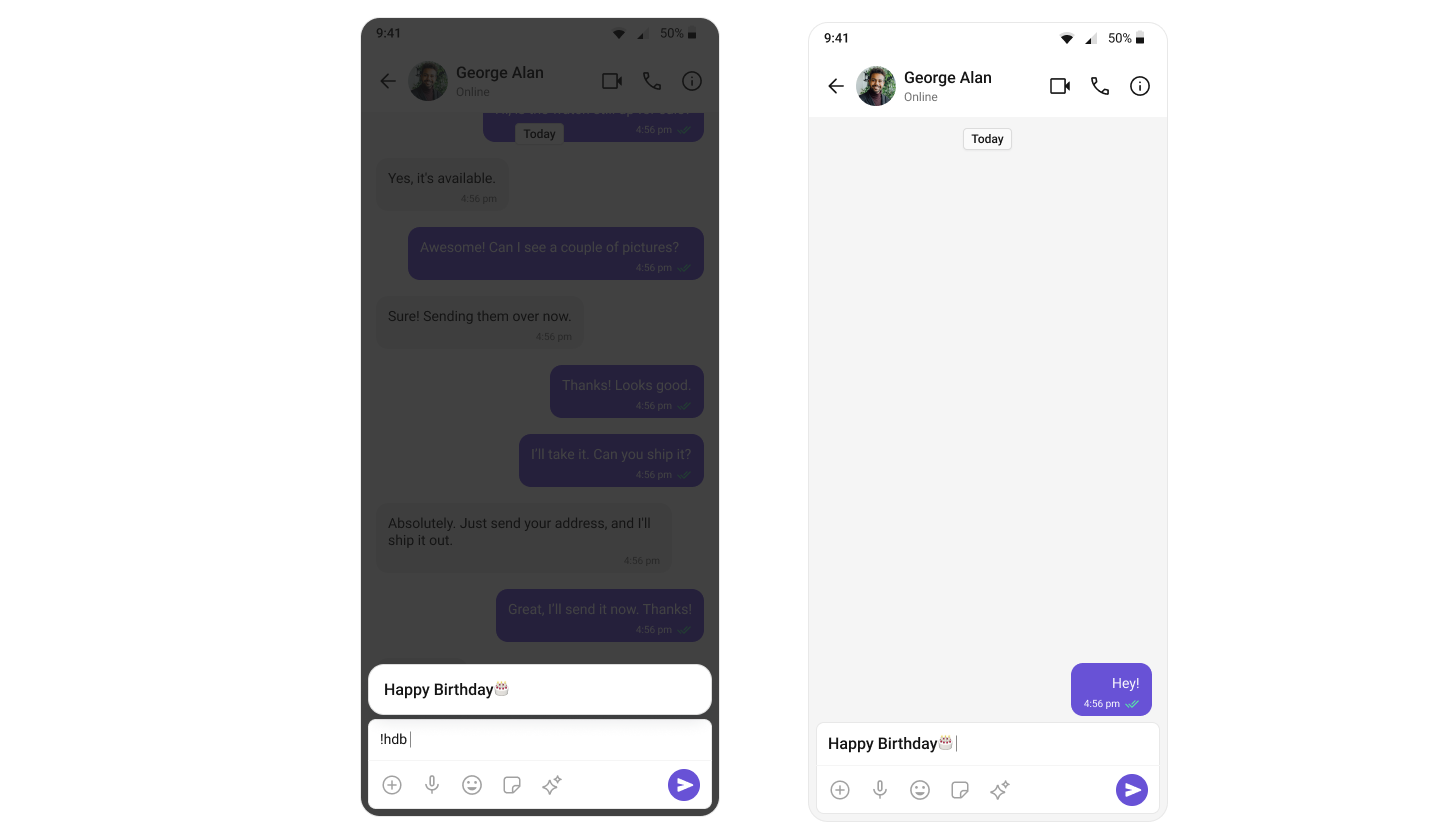
`ShortCutFormatter` extends `CometChatTextFormatter` to expand shortcodes (like `!hi`) into full text via the Message Shortcuts extension. When a user types a shortcut trigger in the composer, a suggestion appears with the expansion — selecting it inserts the text.
 ***
## Steps
### 1. Create the ShortCutFormatter class
Extend `CometChatTextFormatter` with `'!'` as the tracking character:
```kotlin lines theme={null}
class ShortCutFormatter : CometChatTextFormatter('!') {
private val messageShortcuts: HashMap = HashMap()
private val shortcuts: MutableList = ArrayList()
init {
prepareShortCuts()
}
}
```
### 2. Fetch shortcuts from the extension
```kotlin lines theme={null}
private fun prepareShortCuts() {
CometChat.callExtension(
"message-shortcuts", "GET", "/v1/fetch", null,
object : CometChat.CallbackListener() {
override fun onSuccess(responseObject: JSONObject) {
try {
val shortcutObject = responseObject
.getJSONObject("data").getJSONObject("shortcuts")
val keysItr = shortcutObject.keys()
while (keysItr.hasNext()) {
val key = keysItr.next()
messageShortcuts[key] = shortcutObject.getString(key)
}
} catch (e: JSONException) { e.printStackTrace() }
}
override fun onError(e: CometChatException) {}
})
}
```
### 3. Override the search method
Match user input against stored shortcuts and update the suggestion list:
```kotlin lines theme={null}
override fun search(context: Context, queryString: String?) {
val query = trackingCharacter.toString() + queryString
shortcuts.clear()
if (messageShortcuts.containsKey(query)) {
val suggestionItem = SuggestionItem(
"", "$query => ${messageShortcuts[query]}",
null, null, messageShortcuts[query], null, null
)
suggestionItem.isHideLeadingIcon = true
shortcuts.add(suggestionItem)
}
setSuggestionItemList(shortcuts)
}
```
### 4. Override onScrollToBottom
```kotlin theme={null}
override fun onScrollToBottom() {
// No pagination needed for shortcuts
}
```
### 5. Integrate with MessageComposer
Add the XML element to your layout:
```xml lines theme={null}
```
Then add the formatter to the composer:
```kotlin lines theme={null}
import com.cometchat.uikit.core.CometChatUIKit
val cometChatMessageComposer: CometChatMessageComposer = findViewById(R.id.composer)
val cometChatTextFormatters = CometChatUIKit.getDataSource().getTextFormatters(this, cometChatMessageComposer.additionParameter)
cometChatTextFormatters.add(ShortCutFormatter())
cometChatMessageComposer.setTextFormatters(cometChatTextFormatters)
```
```kotlin lines theme={null}
import com.cometchat.uikit.core.CometChatUIKit
// In your composable or ViewModel setup
val textFormatters = CometChatUIKit.getDataSource().getTextFormatters(context, additionParameter)
textFormatters.add(ShortCutFormatter())
CometChatMessageComposer(
user = user,
textFormatters = textFormatters
)
```
Typing `!` followed by a valid shortcut key (e.g., `!hi`) displays a suggestion with the expanded text. Selecting it inserts the expansion into the composer.
***
## Next Steps
Configure the composer where ShortCutFormatter is integrated
Format @mentions with styled tokens and click handling
Browse all feature and formatter guides
Full working sample application on GitHub
***
## Steps
### 1. Create the ShortCutFormatter class
Extend `CometChatTextFormatter` with `'!'` as the tracking character:
```kotlin lines theme={null}
class ShortCutFormatter : CometChatTextFormatter('!') {
private val messageShortcuts: HashMap = HashMap()
private val shortcuts: MutableList = ArrayList()
init {
prepareShortCuts()
}
}
```
### 2. Fetch shortcuts from the extension
```kotlin lines theme={null}
private fun prepareShortCuts() {
CometChat.callExtension(
"message-shortcuts", "GET", "/v1/fetch", null,
object : CometChat.CallbackListener() {
override fun onSuccess(responseObject: JSONObject) {
try {
val shortcutObject = responseObject
.getJSONObject("data").getJSONObject("shortcuts")
val keysItr = shortcutObject.keys()
while (keysItr.hasNext()) {
val key = keysItr.next()
messageShortcuts[key] = shortcutObject.getString(key)
}
} catch (e: JSONException) { e.printStackTrace() }
}
override fun onError(e: CometChatException) {}
})
}
```
### 3. Override the search method
Match user input against stored shortcuts and update the suggestion list:
```kotlin lines theme={null}
override fun search(context: Context, queryString: String?) {
val query = trackingCharacter.toString() + queryString
shortcuts.clear()
if (messageShortcuts.containsKey(query)) {
val suggestionItem = SuggestionItem(
"", "$query => ${messageShortcuts[query]}",
null, null, messageShortcuts[query], null, null
)
suggestionItem.isHideLeadingIcon = true
shortcuts.add(suggestionItem)
}
setSuggestionItemList(shortcuts)
}
```
### 4. Override onScrollToBottom
```kotlin theme={null}
override fun onScrollToBottom() {
// No pagination needed for shortcuts
}
```
### 5. Integrate with MessageComposer
Add the XML element to your layout:
```xml lines theme={null}
```
Then add the formatter to the composer:
```kotlin lines theme={null}
import com.cometchat.uikit.core.CometChatUIKit
val cometChatMessageComposer: CometChatMessageComposer = findViewById(R.id.composer)
val cometChatTextFormatters = CometChatUIKit.getDataSource().getTextFormatters(this, cometChatMessageComposer.additionParameter)
cometChatTextFormatters.add(ShortCutFormatter())
cometChatMessageComposer.setTextFormatters(cometChatTextFormatters)
```
```kotlin lines theme={null}
import com.cometchat.uikit.core.CometChatUIKit
// In your composable or ViewModel setup
val textFormatters = CometChatUIKit.getDataSource().getTextFormatters(context, additionParameter)
textFormatters.add(ShortCutFormatter())
CometChatMessageComposer(
user = user,
textFormatters = textFormatters
)
```
Typing `!` followed by a valid shortcut key (e.g., `!hi`) displays a suggestion with the expanded text. Selecting it inserts the expansion into the composer.
***
## Next Steps
Configure the composer where ShortCutFormatter is integrated
Format @mentions with styled tokens and click handling
Browse all feature and formatter guides
Full working sample application on GitHub