> ## Documentation Index
> Fetch the complete documentation index at: https://www.cometchat.com/docs/llms.txt
> Use this file to discover all available pages before exploring further.
# Color Resources
> Customize CometChat iOS UI Kit color resources with brand colors, backgrounds, text, alerts, dark mode, and theme timing.
| Field | Value |
| ----------------- | ------------------------------------------------------------------ |
| Platform | iOS UI Kit |
| Theme Class | `CometChatTheme` |
| Primary Color | `CometChatTheme.primaryColor` — Main brand color (#6852D6 default) |
| Background Colors | `backgroundColor01`, `backgroundColor02`, `backgroundColor03` |
| Text Colors | `textColorPrimary`, `textColorSecondary`, `textColorTertiary` |
| Alert Colors | `successColor`, `errorColor`, `warningColor`, `infoColor` |
| Dark Mode | Use `UIColor { traitCollection in }` for dynamic colors |
| Apply Timing | Set theme before `CometChatUIKit.init()` |
## Overview
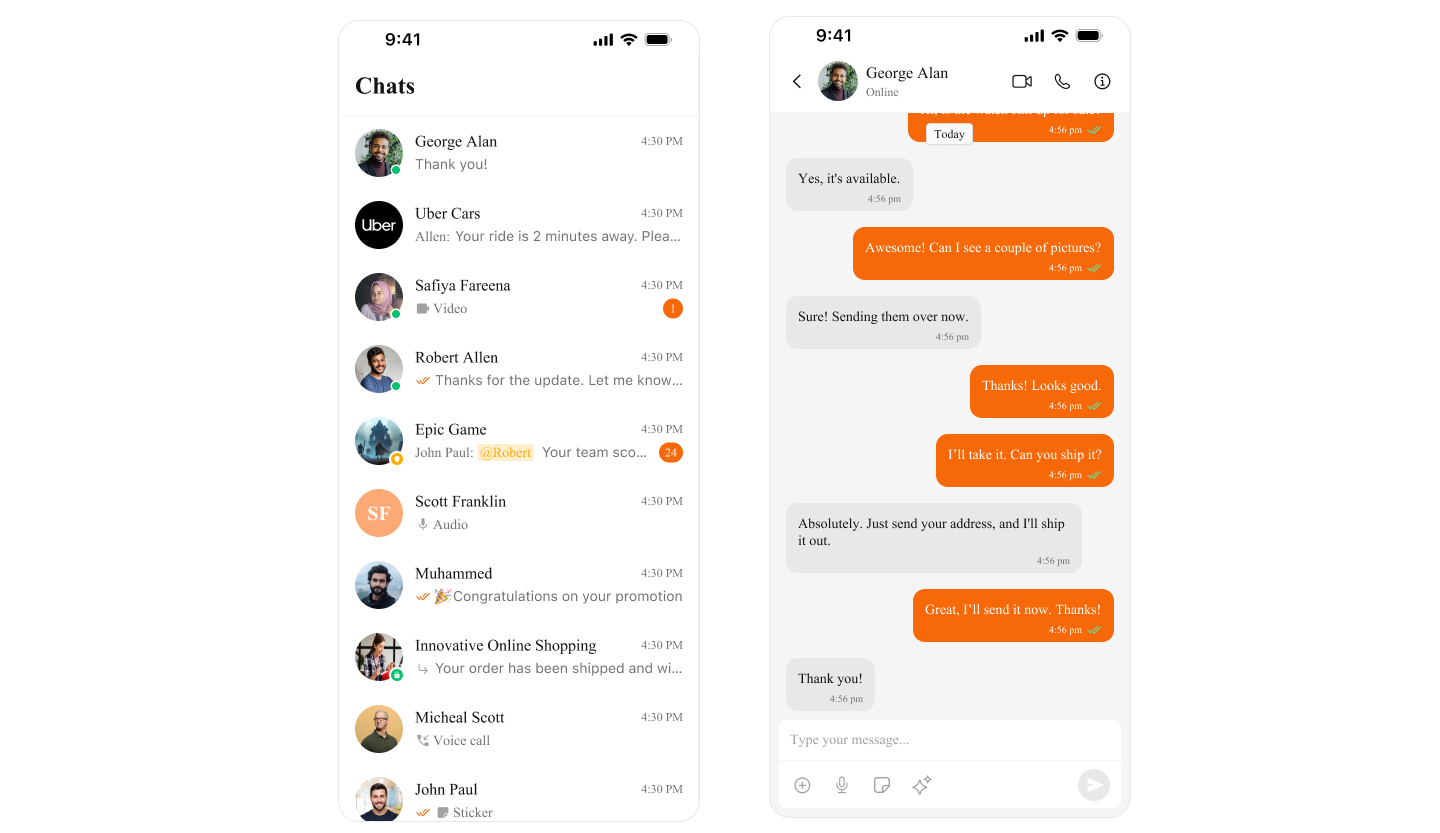
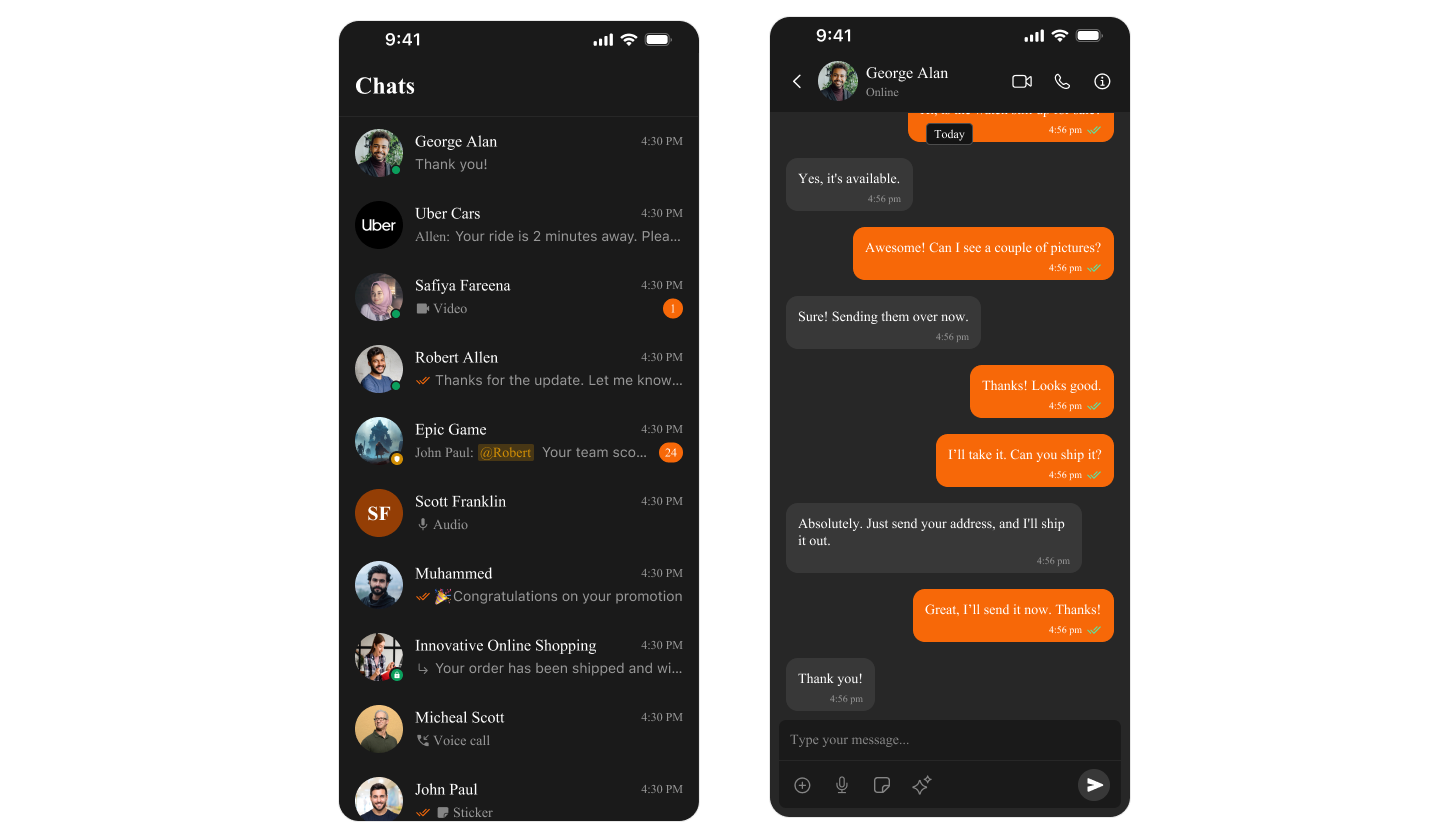
CometChat UI Kit uses `CometChatTheme` to manage colors across all components. Colors automatically adapt to Light and Dark mode, ensuring a consistent experience.
 ***
## Color Categories
| Category | Purpose | Examples |
| -------------- | -------------------------------- | -------------------------------------------- |
| **Primary** | Main brand color, buttons, links | `primaryColor` |
| **Background** | Screen and component backgrounds | `backgroundColor01`, `backgroundColor02` |
| **Text** | Typography colors | `textColorPrimary`, `textColorSecondary` |
| **Border** | Dividers and outlines | `borderColorLight`, `borderColorDark` |
| **Alert** | Status indicators | `successColor`, `errorColor`, `warningColor` |
| **Icon** | Icon tints | `iconColorPrimary`, `iconColorSecondary` |
***
## Quick Start
### Access Default Colors
```swift lines theme={null}
import CometChatUIKitSwift
// Primary brand color
let primary = CometChatTheme.primaryColor // #6852D6
// Background colors
let background = CometChatTheme.backgroundColor01 // White (light) / #141414 (dark)
let secondaryBg = CometChatTheme.backgroundColor02
// Text colors
let primaryText = CometChatTheme.textColorPrimary
let secondaryText = CometChatTheme.textColorSecondary
// Alert colors
let success = CometChatTheme.successColor // Green
let error = CometChatTheme.errorColor // Red
let warning = CometChatTheme.warningColor // Orange
// Icon colors
let iconPrimary = CometChatTheme.iconColorPrimary
let iconSecondary = CometChatTheme.iconColorSecondary
```
***
## Customize Theme Colors
### Change Primary Color (Brand Color)
```swift lines theme={null}
import CometChatUIKitSwift
// Set your brand color globally
CometChatTheme.primaryColor = UIColor(hex: "#FF5722") // Orange brand
// All components will now use this color for:
// - Buttons
// - Links
// - Selected states
// - Accent elements
```
### Complete Theme Customization
```swift lines theme={null}
import CometChatUIKitSwift
class ThemeManager {
static func applyCustomTheme() {
// Brand colors
CometChatTheme.primaryColor = UIColor(hex: "#6200EE") // Purple
// Background colors
CometChatTheme.backgroundColor01 = UIColor(hex: "#FFFFFF")
CometChatTheme.backgroundColor02 = UIColor(hex: "#F5F5F5")
CometChatTheme.backgroundColor03 = UIColor(hex: "#EEEEEE")
// Text colors
CometChatTheme.textColorPrimary = UIColor(hex: "#212121")
CometChatTheme.textColorSecondary = UIColor(hex: "#757575")
CometChatTheme.textColorTertiary = UIColor(hex: "#9E9E9E")
// Border colors
CometChatTheme.borderColorLight = UIColor(hex: "#E0E0E0")
CometChatTheme.borderColorDark = UIColor(hex: "#BDBDBD")
// Alert colors
CometChatTheme.successColor = UIColor(hex: "#4CAF50")
CometChatTheme.errorColor = UIColor(hex: "#F44336")
CometChatTheme.warningColor = UIColor(hex: "#FF9800")
CometChatTheme.infoColor = UIColor(hex: "#2196F3")
// Icon colors
CometChatTheme.iconColorPrimary = UIColor(hex: "#212121")
CometChatTheme.iconColorSecondary = UIColor(hex: "#757575")
}
}
// Apply in AppDelegate or SceneDelegate
ThemeManager.applyCustomTheme()
```
***
## Dark Mode Support
CometChat automatically adapts to system appearance. You can also customize dark mode colors:
```swift lines theme={null}
import CometChatUIKitSwift
import UIKit
class ThemeManager {
static func applyTheme() {
// Create dynamic colors that adapt to light/dark mode
CometChatTheme.primaryColor = UIColor { traitCollection in
return traitCollection.userInterfaceStyle == .dark
? UIColor(hex: "#BB86FC") // Light purple for dark mode
: UIColor(hex: "#6200EE") // Purple for light mode
}
CometChatTheme.backgroundColor01 = UIColor { traitCollection in
return traitCollection.userInterfaceStyle == .dark
? UIColor(hex: "#121212") // Dark background
: UIColor(hex: "#FFFFFF") // White background
}
CometChatTheme.textColorPrimary = UIColor { traitCollection in
return traitCollection.userInterfaceStyle == .dark
? UIColor(hex: "#FFFFFF") // White text
: UIColor(hex: "#212121") // Dark text
}
}
}
```
***
## Color Reference
### Primary Colors
| Property | Light Mode | Dark Mode | Usage |
| -------------- | ---------- | --------- | ----------------------- |
| `primaryColor` | `#6852D6` | `#6852D6` | Buttons, links, accents |
### Background Colors
| Property | Light Mode | Dark Mode | Usage |
| ------------------- | ---------- | --------- | -------------------- |
| `backgroundColor01` | `#FFFFFF` | `#141414` | Main background |
| `backgroundColor02` | `#F5F5F5` | `#1E1E1E` | Secondary background |
| `backgroundColor03` | `#EEEEEE` | `#2C2C2C` | Tertiary background |
### Text Colors
| Property | Light Mode | Dark Mode | Usage |
| -------------------- | ---------- | --------- | ------------------- |
| `textColorPrimary` | `#141414` | `#FFFFFF` | Main text |
| `textColorSecondary` | `#727272` | `#A0A0A0` | Secondary text |
| `textColorTertiary` | `#A0A0A0` | `#727272` | Hints, placeholders |
### Alert Colors
| Property | Color | Usage |
| -------------- | --------- | -------------------- |
| `successColor` | `#09C26F` | Success states |
| `errorColor` | `#F44649` | Errors, missed calls |
| `warningColor` | `#FFAB00` | Warnings |
| `infoColor` | `#2196F3` | Information |
### Border Colors
| Property | Light Mode | Dark Mode | Usage |
| ------------------ | ---------- | --------- | ----------------- |
| `borderColorLight` | `#E8E8E8` | `#2C2C2C` | Subtle borders |
| `borderColorDark` | `#CCCCCC` | `#404040` | Prominent borders |
***
## Production Example
Complete app with custom branding:
```swift lines theme={null}
import UIKit
import CometChatUIKitSwift
@main
class AppDelegate: UIResponder, UIApplicationDelegate {
func application(_ application: UIApplication, didFinishLaunchingWithOptions launchOptions: [UIApplication.LaunchOptionsKey: Any]?) -> Bool {
// Apply custom theme before initializing CometChat
applyBrandTheme()
return true
}
private func applyBrandTheme() {
// Your brand colors
let brandPrimary = UIColor(hex: "#1E88E5") // Blue
let brandSecondary = UIColor(hex: "#FFC107") // Amber
// Apply to CometChat theme
CometChatTheme.primaryColor = brandPrimary
// Customize backgrounds
CometChatTheme.backgroundColor01 = UIColor { trait in
trait.userInterfaceStyle == .dark
? UIColor(hex: "#0D1117")
: UIColor(hex: "#FFFFFF")
}
CometChatTheme.backgroundColor02 = UIColor { trait in
trait.userInterfaceStyle == .dark
? UIColor(hex: "#161B22")
: UIColor(hex: "#F6F8FA")
}
// Customize text
CometChatTheme.textColorPrimary = UIColor { trait in
trait.userInterfaceStyle == .dark
? UIColor(hex: "#C9D1D9")
: UIColor(hex: "#24292F")
}
CometChatTheme.textColorSecondary = UIColor { trait in
trait.userInterfaceStyle == .dark
? UIColor(hex: "#8B949E")
: UIColor(hex: "#57606A")
}
// Alert colors
CometChatTheme.successColor = UIColor(hex: "#238636")
CometChatTheme.errorColor = UIColor(hex: "#DA3633")
CometChatTheme.warningColor = brandSecondary
}
}
// UIColor extension for hex support
extension UIColor {
convenience init(hex: String) {
var hexSanitized = hex.trimmingCharacters(in: .whitespacesAndNewlines)
hexSanitized = hexSanitized.replacingOccurrences(of: "#", with: "")
var rgb: UInt64 = 0
Scanner(string: hexSanitized).scanHexInt64(&rgb)
let r = CGFloat((rgb & 0xFF0000) >> 16) / 255.0
let g = CGFloat((rgb & 0x00FF00) >> 8) / 255.0
let b = CGFloat(rgb & 0x0000FF) / 255.0
self.init(red: r, green: g, blue: b, alpha: 1.0)
}
}
```
***
## Related
Style individual components
Complete theming guide
Initial setup
***
## Color Categories
| Category | Purpose | Examples |
| -------------- | -------------------------------- | -------------------------------------------- |
| **Primary** | Main brand color, buttons, links | `primaryColor` |
| **Background** | Screen and component backgrounds | `backgroundColor01`, `backgroundColor02` |
| **Text** | Typography colors | `textColorPrimary`, `textColorSecondary` |
| **Border** | Dividers and outlines | `borderColorLight`, `borderColorDark` |
| **Alert** | Status indicators | `successColor`, `errorColor`, `warningColor` |
| **Icon** | Icon tints | `iconColorPrimary`, `iconColorSecondary` |
***
## Quick Start
### Access Default Colors
```swift lines theme={null}
import CometChatUIKitSwift
// Primary brand color
let primary = CometChatTheme.primaryColor // #6852D6
// Background colors
let background = CometChatTheme.backgroundColor01 // White (light) / #141414 (dark)
let secondaryBg = CometChatTheme.backgroundColor02
// Text colors
let primaryText = CometChatTheme.textColorPrimary
let secondaryText = CometChatTheme.textColorSecondary
// Alert colors
let success = CometChatTheme.successColor // Green
let error = CometChatTheme.errorColor // Red
let warning = CometChatTheme.warningColor // Orange
// Icon colors
let iconPrimary = CometChatTheme.iconColorPrimary
let iconSecondary = CometChatTheme.iconColorSecondary
```
***
## Customize Theme Colors
### Change Primary Color (Brand Color)
```swift lines theme={null}
import CometChatUIKitSwift
// Set your brand color globally
CometChatTheme.primaryColor = UIColor(hex: "#FF5722") // Orange brand
// All components will now use this color for:
// - Buttons
// - Links
// - Selected states
// - Accent elements
```
### Complete Theme Customization
```swift lines theme={null}
import CometChatUIKitSwift
class ThemeManager {
static func applyCustomTheme() {
// Brand colors
CometChatTheme.primaryColor = UIColor(hex: "#6200EE") // Purple
// Background colors
CometChatTheme.backgroundColor01 = UIColor(hex: "#FFFFFF")
CometChatTheme.backgroundColor02 = UIColor(hex: "#F5F5F5")
CometChatTheme.backgroundColor03 = UIColor(hex: "#EEEEEE")
// Text colors
CometChatTheme.textColorPrimary = UIColor(hex: "#212121")
CometChatTheme.textColorSecondary = UIColor(hex: "#757575")
CometChatTheme.textColorTertiary = UIColor(hex: "#9E9E9E")
// Border colors
CometChatTheme.borderColorLight = UIColor(hex: "#E0E0E0")
CometChatTheme.borderColorDark = UIColor(hex: "#BDBDBD")
// Alert colors
CometChatTheme.successColor = UIColor(hex: "#4CAF50")
CometChatTheme.errorColor = UIColor(hex: "#F44336")
CometChatTheme.warningColor = UIColor(hex: "#FF9800")
CometChatTheme.infoColor = UIColor(hex: "#2196F3")
// Icon colors
CometChatTheme.iconColorPrimary = UIColor(hex: "#212121")
CometChatTheme.iconColorSecondary = UIColor(hex: "#757575")
}
}
// Apply in AppDelegate or SceneDelegate
ThemeManager.applyCustomTheme()
```
***
## Dark Mode Support
CometChat automatically adapts to system appearance. You can also customize dark mode colors:
```swift lines theme={null}
import CometChatUIKitSwift
import UIKit
class ThemeManager {
static func applyTheme() {
// Create dynamic colors that adapt to light/dark mode
CometChatTheme.primaryColor = UIColor { traitCollection in
return traitCollection.userInterfaceStyle == .dark
? UIColor(hex: "#BB86FC") // Light purple for dark mode
: UIColor(hex: "#6200EE") // Purple for light mode
}
CometChatTheme.backgroundColor01 = UIColor { traitCollection in
return traitCollection.userInterfaceStyle == .dark
? UIColor(hex: "#121212") // Dark background
: UIColor(hex: "#FFFFFF") // White background
}
CometChatTheme.textColorPrimary = UIColor { traitCollection in
return traitCollection.userInterfaceStyle == .dark
? UIColor(hex: "#FFFFFF") // White text
: UIColor(hex: "#212121") // Dark text
}
}
}
```
***
## Color Reference
### Primary Colors
| Property | Light Mode | Dark Mode | Usage |
| -------------- | ---------- | --------- | ----------------------- |
| `primaryColor` | `#6852D6` | `#6852D6` | Buttons, links, accents |
### Background Colors
| Property | Light Mode | Dark Mode | Usage |
| ------------------- | ---------- | --------- | -------------------- |
| `backgroundColor01` | `#FFFFFF` | `#141414` | Main background |
| `backgroundColor02` | `#F5F5F5` | `#1E1E1E` | Secondary background |
| `backgroundColor03` | `#EEEEEE` | `#2C2C2C` | Tertiary background |
### Text Colors
| Property | Light Mode | Dark Mode | Usage |
| -------------------- | ---------- | --------- | ------------------- |
| `textColorPrimary` | `#141414` | `#FFFFFF` | Main text |
| `textColorSecondary` | `#727272` | `#A0A0A0` | Secondary text |
| `textColorTertiary` | `#A0A0A0` | `#727272` | Hints, placeholders |
### Alert Colors
| Property | Color | Usage |
| -------------- | --------- | -------------------- |
| `successColor` | `#09C26F` | Success states |
| `errorColor` | `#F44649` | Errors, missed calls |
| `warningColor` | `#FFAB00` | Warnings |
| `infoColor` | `#2196F3` | Information |
### Border Colors
| Property | Light Mode | Dark Mode | Usage |
| ------------------ | ---------- | --------- | ----------------- |
| `borderColorLight` | `#E8E8E8` | `#2C2C2C` | Subtle borders |
| `borderColorDark` | `#CCCCCC` | `#404040` | Prominent borders |
***
## Production Example
Complete app with custom branding:
```swift lines theme={null}
import UIKit
import CometChatUIKitSwift
@main
class AppDelegate: UIResponder, UIApplicationDelegate {
func application(_ application: UIApplication, didFinishLaunchingWithOptions launchOptions: [UIApplication.LaunchOptionsKey: Any]?) -> Bool {
// Apply custom theme before initializing CometChat
applyBrandTheme()
return true
}
private func applyBrandTheme() {
// Your brand colors
let brandPrimary = UIColor(hex: "#1E88E5") // Blue
let brandSecondary = UIColor(hex: "#FFC107") // Amber
// Apply to CometChat theme
CometChatTheme.primaryColor = brandPrimary
// Customize backgrounds
CometChatTheme.backgroundColor01 = UIColor { trait in
trait.userInterfaceStyle == .dark
? UIColor(hex: "#0D1117")
: UIColor(hex: "#FFFFFF")
}
CometChatTheme.backgroundColor02 = UIColor { trait in
trait.userInterfaceStyle == .dark
? UIColor(hex: "#161B22")
: UIColor(hex: "#F6F8FA")
}
// Customize text
CometChatTheme.textColorPrimary = UIColor { trait in
trait.userInterfaceStyle == .dark
? UIColor(hex: "#C9D1D9")
: UIColor(hex: "#24292F")
}
CometChatTheme.textColorSecondary = UIColor { trait in
trait.userInterfaceStyle == .dark
? UIColor(hex: "#8B949E")
: UIColor(hex: "#57606A")
}
// Alert colors
CometChatTheme.successColor = UIColor(hex: "#238636")
CometChatTheme.errorColor = UIColor(hex: "#DA3633")
CometChatTheme.warningColor = brandSecondary
}
}
// UIColor extension for hex support
extension UIColor {
convenience init(hex: String) {
var hexSanitized = hex.trimmingCharacters(in: .whitespacesAndNewlines)
hexSanitized = hexSanitized.replacingOccurrences(of: "#", with: "")
var rgb: UInt64 = 0
Scanner(string: hexSanitized).scanHexInt64(&rgb)
let r = CGFloat((rgb & 0xFF0000) >> 16) / 255.0
let g = CGFloat((rgb & 0x00FF00) >> 8) / 255.0
let b = CGFloat(rgb & 0x0000FF) / 255.0
self.init(red: r, green: g, blue: b, alpha: 1.0)
}
}
```
***
## Related
Style individual components
Complete theming guide
Initial setup