

AI Integration Quick Reference
AI Integration Quick Reference
Get your Application Keys
Signup for CometChat and then:- Create a new app
- Head over to the API Keys section and note the Auth Key, App ID & Region
Minimum Requirement
- Android API Level 21
- AndroidX Compatibility
- iOS 12 or higher
- Flutter 3.19.0 or higher (Dart 3.3.0 or higher)
Add the CometChat Dependency
- Add following code to podfile inside iOS section of your app
- Ruby
- For iOS, change the deployment target to
11or higher. - For iOS, navigate to your iOS folder in terminal or CMD and do
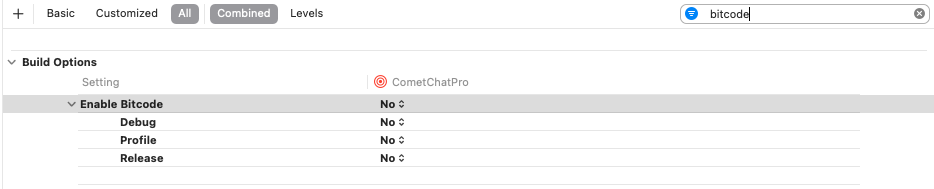
pod install. For apple chip system use rosetta terminal. - For iOS you can set the Enabled Bitcode settings to NO present in build settings of XCODE project
- Dart
Initialise CometChat
Theinit() method initialises the settings required for CometChat. The init() method takes the below parameters:
- appID - You CometChat App ID
- appSettings - An object of the AppSettings class can be created using the AppSettingsBuilder class. The region field is mandatory and can be set using the
setRegion()method.
AppSettings class allows you to configure three settings:
- Region: The region where you app was created.
- Presence Subscription: Represents the subscription type for user presence (real-time online/offline status)
- autoEstablishSocketConnection(boolean value): This property takes a boolean value which when set to true informs the SDK to manage the web-socket connection internally. If set to false, it informs the SDK that the web-socket connection will be managed manually. The default value for this parameter is true. For more information on this, please check the Connection Behaviour section. The default value for this property is true.
- adminHost(adminHost: string): This method takes the admin URL as input and uses this admin URL instead of the default admin URL. This can be used in case of dedicated deployment of CometChat.
- clientHost(clientHost: string): This method takes the client URL as input and uses this client URL instead of the default client URL. This can be used in case of dedicated deployment of CometChat.
- Dart
init() method on app startup.
Auto Mode Connection
Know more about auto mode connection click here
Manual Mode Connection
Know more about manual mode connection click here