

Documentation Index
Fetch the complete documentation index at: https://www.cometchat.com/docs/llms.txt
Use this file to discover all available pages before exploring further.
AI Integration Quick Reference
AI Integration Quick Reference
Message class hierarchy:Message categories and types:
- message →
text,image,video,audio,file - custom → Developer-defined types (e.g.,
location,poll) - interactive →
form,card,scheduler,customInteractive - action →
groupMember(joined/left/kicked/banned),message(edited/deleted) - call →
audio,video - agentic →
assistant,tool-result,tool-arguments
message, custom, interactive, action, call) and has a specific type within that category. On the SDK side, all messages extend BaseMessage, with subclasses like TextMessage, MediaMessage, CustomMessage, InteractiveMessage, Action, and Call. Understanding this hierarchy helps you handle different message types correctly.
Message Hierarchy
The below diagram helps you better understand the various message categories and types that a CometChat message can belong to.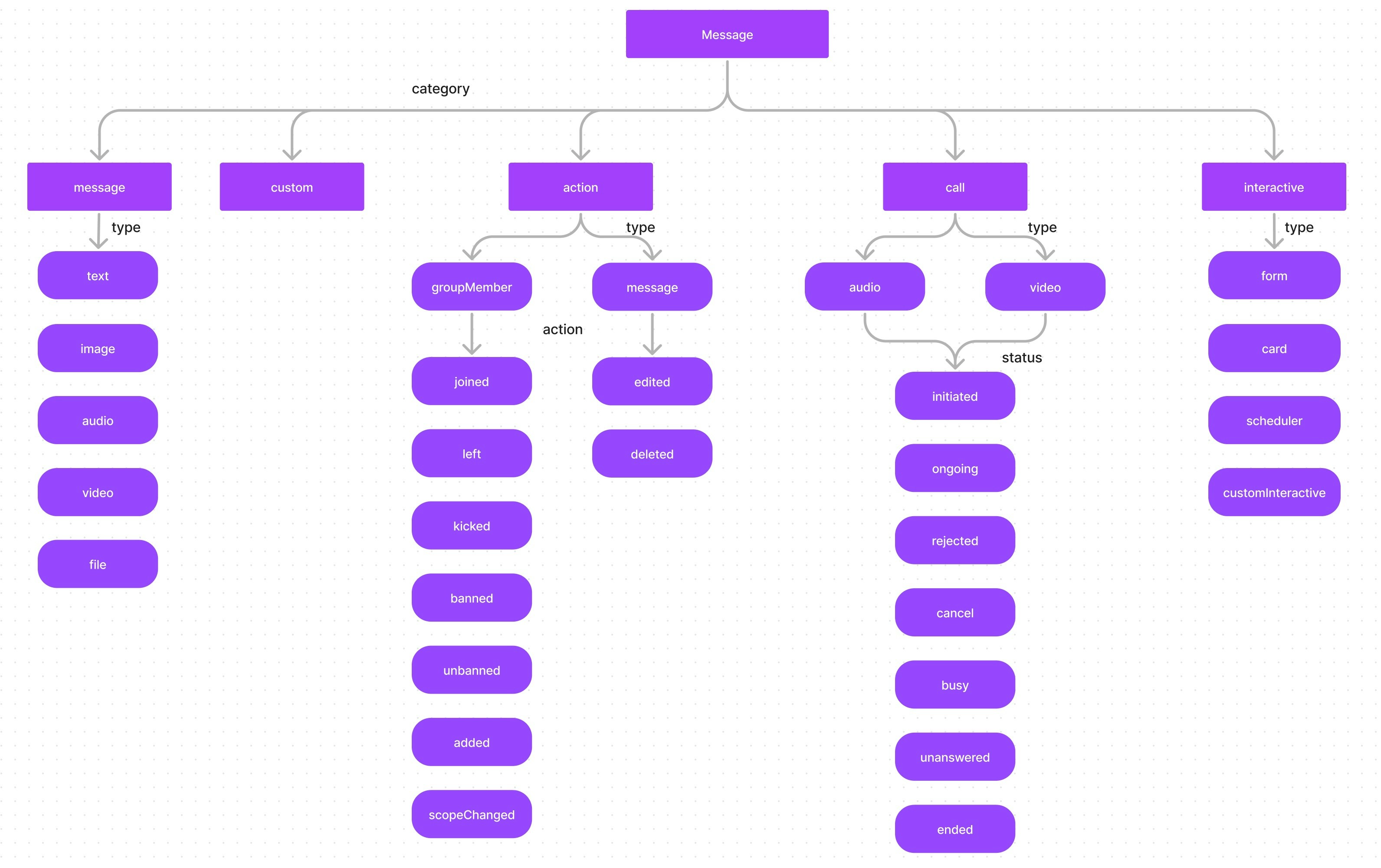
The calling feature is not currently supported by the CometChat Flutter SDK.
Categories Overview
| Category | Types | SDK Class | Description |
|---|---|---|---|
message | text, image, video, audio, file | TextMessage, MediaMessage | Standard user messages |
custom | Developer-defined | CustomMessage | Custom data (location, polls, etc.) |
interactive | form, card, scheduler, customInteractive | InteractiveMessage | Messages with actionable UI elements |
action | groupMember, message | Action | System-generated events |
call | audio, video | Call | Call-related messages |
BaseMessage Properties
All message types extendBaseMessage, which provides these common properties:
| Property | Type | Description |
|---|---|---|
id | int | Unique message identifier |
muid | String | Message unique identifier (client-side) |
sender | User? | The user who sent the message |
receiver | AppEntity? | The receiver (User or Group) |
receiverUid | String | UID of the receiver (user UID or group GUID) |
type | String | Message type (e.g., text, image, custom) |
receiverType | String | "user" or "group" |
category | String | Message category (message, custom, action, interactive, call) |
sentAt | DateTime? | Timestamp when the message was sent |
deliveredAt | DateTime? | Timestamp when the message was delivered |
readAt | DateTime? | Timestamp when the message was read |
metadata | Map<String, dynamic>? | Custom key-value data attached to the message |
readByMeAt | DateTime? | Timestamp when the current user read the message |
deliveredToMeAt | DateTime? | Timestamp when the message was delivered to the current user |
deletedAt | DateTime? | Timestamp when the message was deleted |
editedAt | DateTime? | Timestamp when the message was last edited |
deletedBy | String? | UID of the user who deleted the message |
editedBy | String? | UID of the user who edited the message |
updatedAt | DateTime? | Timestamp of the last update |
conversationId | String? | ID of the conversation this message belongs to |
parentMessageId | int | ID of the parent message (for threaded messages) |
replyCount | int | Number of replies to this message |
unreadRepliesCount | int | Number of unread replies |
mentionedUsers | List<User> | Users mentioned in this message |
hasMentionedMe | bool? | Whether the current user is mentioned |
reactions | List<ReactionCount> | Reactions on this message |
quotedMessage | BaseMessage? | The message being quoted/replied to |
quotedMessageId | int? | ID of the quoted message |
Message
A message belonging to the categorymessage can be classified into either 1 of the below types:
- text - A plain text message
- image- An image message
- video- A video message
- audio- An audio message
- file- A file message
TextMessage Properties
| Property | Type | Description |
|---|---|---|
text | String | The text content of the message |
tags | List<String>? | Tags associated with the message |
moderationStatus | ModerationStatusEnum? | Content moderation status |
MediaMessage Properties
| Property | Type | Description |
|---|---|---|
caption | String? | Caption for the media file |
attachment | Attachment? | Primary file attachment details |
file | String? | Local file path |
files | List<String>? | Multiple local file paths |
attachments | List<Attachment>? | Multiple file attachments |
tags | List<String>? | Tags associated with the message |
moderationStatus | ModerationStatusEnum? | Content moderation status |
Attachment Properties
| Property | Type | Description |
|---|---|---|
fileUrl | String | URL of the uploaded file |
fileName | String | Name of the file |
fileExtension | String | File extension (e.g., jpg, mp4) |
fileMimeType | String | MIME type (e.g., image/jpeg) |
fileSize | int? | File size in bytes |
Custom
In the case of messages that belong to thecustom category, there are no predefined types. Custom messages can be used by developers to send messages that do not fit in the default category and types provided by CometChat. For messages with the category custom, the developers can set their own type to uniquely identify the custom message. A very good example of a custom message would be the sharing of location co-ordinates. In this case, the developer can decide to use the custom message with type set to location.
CustomMessage Properties
| Property | Type | Description |
|---|---|---|
subType | String? | Sub-type for further classification |
customData | Map<String, dynamic>? | Custom key-value payload |
tags | List<String>? | Tags associated with the message |
conversationText | String? | Text shown in conversation list |
updateConversation | bool? | Whether to update the conversation list |
sendNotification | bool? | Whether to send a push notification |
Interactive
AnInteractiveMessage is a specialized object that encapsulates an interactive unit within a chat message, such as an embedded form that users can fill out directly within the chat interface. Messages belonging to the interactive category can further be classified into one of the below types:
- form- for interactive form
- card- for interactive card
- scheduler- for scheduler message
- customInteractive- for custom interaction messages
To know about Interactive messages please click here.
InteractiveMessage Properties
| Property | Type | Description |
|---|---|---|
interactiveData | Map<String, dynamic> | Data defining the interactive element (form fields, card content, etc.) |
interactions | List<Interaction>? | List of user interactions with this message |
interactionGoal | InteractionGoal? | Goal criteria for the interactive element |
tags | List<String>? | Tags associated with the message |
allowSenderInteraction | bool | Whether the sender can interact with the element |
Action
Action messages are system-generated messages. Messages belonging to theaction category can further be classified into one of the below types:
- groupMember - action performed on a group member.
- message - action performed on a message.
Action Properties
| Property | Type | Description |
|---|---|---|
message | String? | Human-readable action description |
rawData | String? | Raw action data |
action | String? | The action performed (e.g., joined, kicked, edited) |
oldScope | String? | Previous member scope (for scope changes) |
newScope | String? | New member scope (for scope changes) |
actionBy | AppEntity? | Entity that performed the action |
actionFor | AppEntity? | Entity the action was performed for |
actionOn | AppEntity? | Entity the action was performed on |
action which actually determine the action that has been performed For the type groupMember the action can be either one of the below:
- joined - when a group member joins a group
- left - when a group member leaves a group
- kicked - when a group member is kicked from the group
- banned - when a group member is banned from the group
- unbanned - when a group member is unbanned from the group
- added - when a user is added to the group
- scopeChanged - When the scope of a group member is changed.
message, the action can be either one of the below:
- edited - when a message is edited.
- deleted - when a message is deleted.
Call
Messages with the category call are Calling related messages. These can belong to either one of the 2 types- audio
- video
Call Properties
| Property | Type | Description |
|---|---|---|
sessionId | String? | Unique call session identifier |
callStatus | String? | Current status of the call |
action | String? | Call action type |
rawData | String? | Raw call data |
initiatedAt | DateTime? | When the call was initiated |
joinedAt | DateTime? | When the receiver joined the call |
callInitiator | AppEntity? | The user who initiated the call |
callReceiver | AppEntity? | The user/group receiving the call |
| Status | Description |
|---|---|
initiated | Call started to a user/group |
ongoing | Receiver accepted the call |
cancelled | Initiator canceled the call |
rejected | Receiver rejected the call |
unanswered | Call was not answered |
busy | Receiver was on another call |
ended | Call completed successfully |
Next Steps
Send Messages
Learn how to send text, media, and custom messages
Receive Messages
Handle incoming messages with real-time listeners
Interactive Messages
Create forms, cards, and interactive elements
Edit & Delete Messages
Modify or remove sent messages