Documentation Index Fetch the complete documentation index at: https://www.cometchat.com/docs/llms.txt
Use this file to discover all available pages before exploring further.
AI Integration Quick Reference
Field Value Package @cometchat/chat-uikit-angularFramework Angular Components CometChatMessageHeaderComponent, CometChatMessageListComponent, CometChatMessageComposerComponentLayout Single chat window — no sidebar, no conversation list Prerequisite Complete Angular Integration Steps 1–5 first Pattern Support chat, embedded widgets, focused messaging
This guide builds a single chat window — no sidebar, no conversation list. Users go directly into a one-to-one or group chat. Good for support chat, embedded widgets, or any focused messaging experience.
This assumes you’ve already completed Angular Integration (project created, UI Kit installed, init + login working, CSS imported).
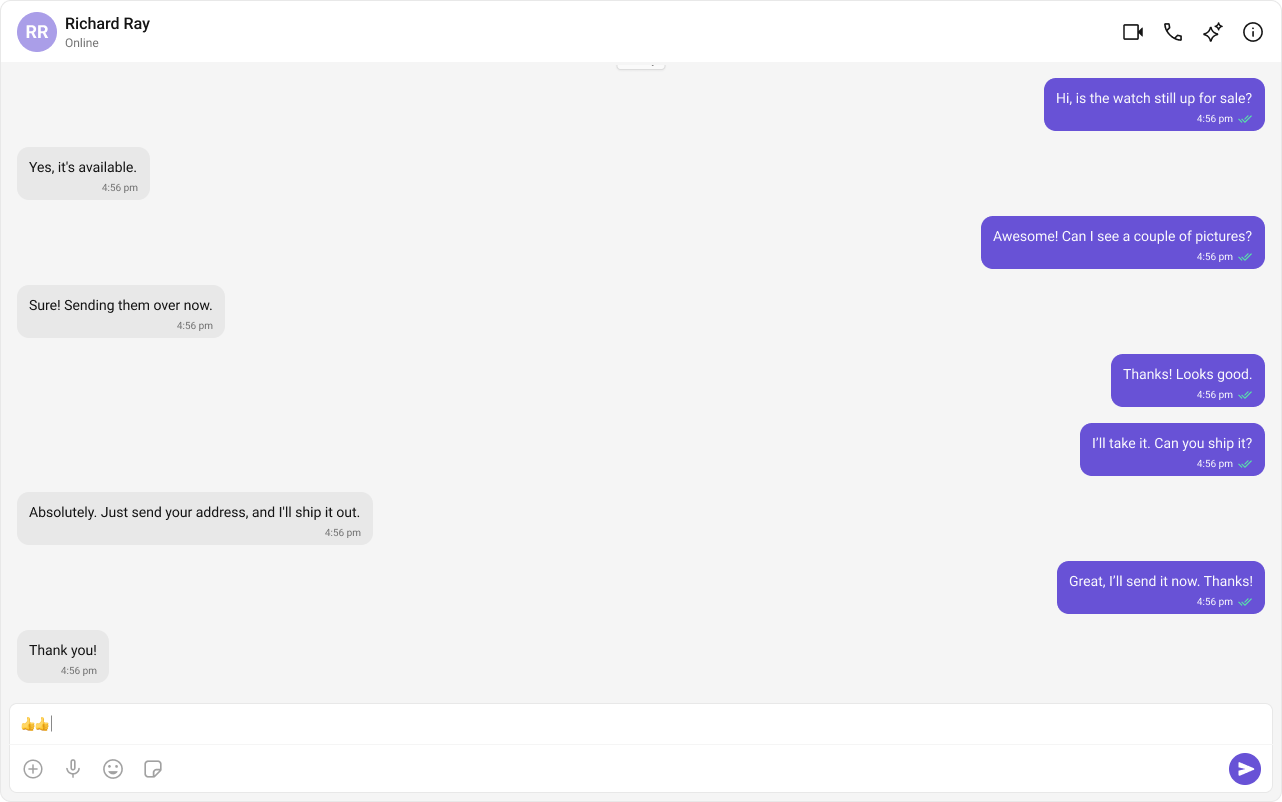
What You’re Building Three components stacked vertically:
Chat header — displays recipient name, avatar, online status, and optional call buttonsMessage list — real-time chat history with scrollingMessage composer — text input with media, emojis, and reactions
Everything goes in AppComponent — no extra files needed.
Step 1 — Update AppComponent The app fetches a user (or group) on mount, sets it as the active entity via ChatStateService, and renders the three message components. The components auto-subscribe to the service — no prop passing needed.
import { Component , inject , OnInit } from "@angular/core" ; import { CometChatUIKit , CometChatMessageHeaderComponent , CometChatMessageListComponent , CometChatMessageComposerComponent , ChatStateService , } from "@cometchat/chat-uikit-angular" ; import { CometChat } from "@cometchat/chat-sdk-javascript" ; @ Component ({ selector: "app-root" , standalone: true , imports: [ CometChatMessageHeaderComponent , CometChatMessageListComponent , CometChatMessageComposerComponent , ], template: ` @if (chatStateService.activeUser() || chatStateService.activeGroup()) { <div class="chat-window"> <cometchat-message-header></cometchat-message-header> <cometchat-message-list></cometchat-message-list> <cometchat-message-composer></cometchat-message-composer> </div> } @else { <div class="empty-conversation"> Loading chat... </div> } ` , styles: ` .chat-window { display: flex; flex-direction: column; height: 100vh; width: 100vw; } .empty-conversation { height: 100vh; width: 100%; display: flex; justify-content: center; align-items: center; background: var(--cometchat-background-color-03, #F5F5F5); color: var(--cometchat-text-color-secondary, #727272); font: var(--cometchat-font-body-regular, 400 14px Roboto); } .cometchat .cometchat-message-composer { border-radius: 0px; } ` , }) export class AppComponent implements OnInit { chatStateService = inject ( ChatStateService ); ngOnInit () : void { CometChatUIKit . getLoggedinUser (). then (( user : CometChat . User | null ) => { if ( ! user ) { CometChatUIKit . login ( "cometchat-uid-1" ) . then (() => this . loadUser ()) . catch ( console . log ); } else { this . loadUser (); } }); } private loadUser () : void { // Fetch the user whose chat you want to load const UID = "cometchat-uid-2" ; CometChat . getUser ( UID ). then ( ( user : CometChat . User ) => { this . chatStateService . setActiveUser ( user ); }, ( error : CometChat . CometChatException ) => { console . error ( "User fetch failed:" , error ); } ); // To load a group chat instead, uncomment below: // const GUID = "GUID"; // CometChat.getGroup(GUID).then( // (group: CometChat.Group) => { // this.chatStateService.setActiveGroup(group); // }, // (error: CometChat.CometChatException) => { // console.error("Group fetch failed:", error); // } // ); } }
Key points:
CometChat.getUser(UID) fetches the user object from the SDK — you need a real user object, not a manually constructed one.chatStateService.setActiveUser(user) sets the active entity — all message components auto-subscribe and render accordingly.Setting a user automatically clears any active group (mutual exclusivity).
Switching Between User and Group Chat To load a group chat instead of one-to-one, replace the setActiveUser call with setActiveGroup:
const GUID = "GUID" ; // Replace with your actual Group ID CometChat . getGroup ( GUID ). then ( ( group : CometChat . Group ) => { this . chatStateService . setActiveGroup ( group ); }, ( error : CometChat . CometChatException ) => { console . error ( "Failed to fetch group:" , error ); } ); You can also determine this dynamically — for example, based on a route parameter or a selection from another part of your app.
Step 2 — Run the Project You should see the chat window load with the conversation for the UID you set.
Next Steps
Theming Customize colors, fonts, and styles to match your brand
Components Overview Browse all prebuilt UI components
Angular Integration Back to the main setup guide
Core Features Chat features included out of the box