Documentation Index Fetch the complete documentation index at: https://www.cometchat.com/docs/llms.txt
Use this file to discover all available pages before exploring further.
AI Integration Quick Reference
Field Value Package @cometchat/chat-uikit-angularFramework Angular Components CometChatConversationsComponent, CometChatCallLogsComponent, CometChatUsersComponent, CometChatMessageHeaderComponent, CometChatMessageListComponent, CometChatMessageComposerComponentLayout Tabbed sidebar (Chats, Calls, Users) + message view Prerequisite Complete Angular Integration Steps 1–5 first Pattern Full-featured messaging app with multiple sections
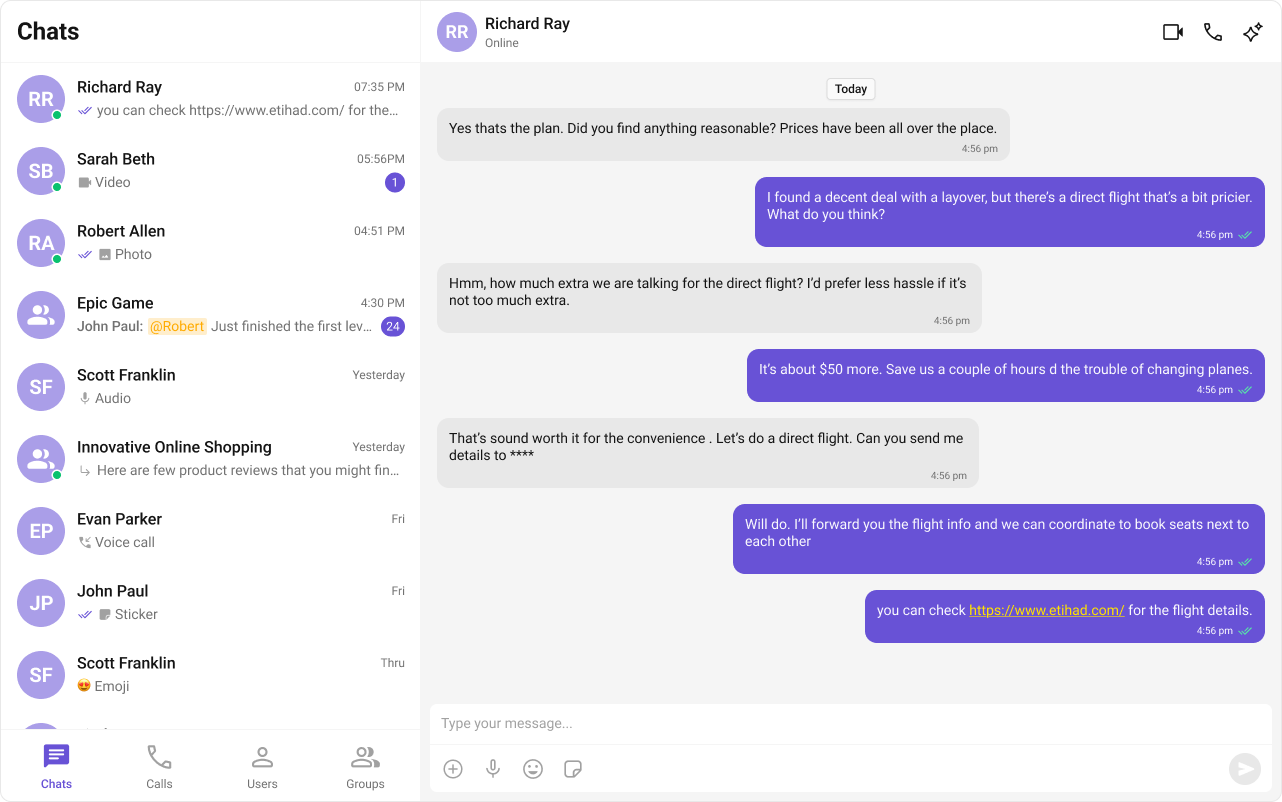
This guide builds a tabbed messaging UI — Chats, Calls, and Users tabs, with a message view. Good for full-featured apps that need more than just conversations.
This assumes you’ve already completed Angular Integration (project created, UI Kit installed, init + login working, CSS imported).
What You’re Building Three sections working together:
Tab bar — switches between Chats, Call Logs, and UsersList view — renders the list for the active tab (conversations, call logs, or users)Message view — header + messages + composer for the selected item
Step 1 — Update AppComponent Wire everything together. ChatStateService handles the state — cometchat-conversations and cometchat-users automatically update the service when an item is clicked, and the message components auto-subscribe.
import { Component , inject , OnInit } from "@angular/core" ; import { CometChatUIKit , CometChatConversationsComponent , CometChatUsersComponent , CometChatCallLogsComponent , CometChatMessageHeaderComponent , CometChatMessageListComponent , CometChatMessageComposerComponent , ChatStateService , } from "@cometchat/chat-uikit-angular" ; import { CometChat } from "@cometchat/chat-sdk-javascript" ; @ Component ({ selector: "app-root" , standalone: true , imports: [ CometChatConversationsComponent , CometChatUsersComponent , CometChatCallLogsComponent , CometChatMessageHeaderComponent , CometChatMessageListComponent , CometChatMessageComposerComponent , ], template: ` @if (isLoggedIn) { <div class="tab-layout"> <div class="sidebar"> <nav class="tab-bar"> <button [class.active]="activeTab === 'chats'" (click)="activeTab = 'chats'" > Chats </button> <button [class.active]="activeTab === 'calls'" (click)="activeTab = 'calls'" > Call Logs </button> <button [class.active]="activeTab === 'users'" (click)="activeTab = 'users'" > Users </button> </nav> <div class="tab-content"> @switch (activeTab) { @case ('chats') { <cometchat-conversations></cometchat-conversations> } @case ('calls') { <cometchat-call-logs></cometchat-call-logs> } @case ('users') { <cometchat-users></cometchat-users> } } </div> </div> @if (chatStateService.activeUser() || chatStateService.activeGroup()) { <div class="chat-window"> <cometchat-message-header></cometchat-message-header> <cometchat-message-list></cometchat-message-list> <cometchat-message-composer></cometchat-message-composer> </div> } @else { <div class="empty-conversation"> Select a conversation to start chatting </div> } </div> } @else { <p>Loading...</p> } ` , styles: ` :host { display: flex; height: 100vh; width: 100vw; } .tab-layout { display: flex; width: 100%; height: 100%; } .sidebar { width: 400px; display: flex; flex-direction: column; border-right: 1px solid #e0e0e0; } .tab-bar { display: flex; border-bottom: 1px solid #e0e0e0; } .tab-bar button { flex: 1; padding: 12px; border: none; background: transparent; cursor: pointer; font-size: 14px; } .tab-bar button.active { border-bottom: 2px solid #3399ff; font-weight: 600; } .tab-content { flex: 1; overflow: hidden; } .chat-window { flex: 1; display: flex; flex-direction: column; } .empty-conversation { height: 100vh; width: 100%; display: flex; justify-content: center; align-items: center; background: var(--cometchat-background-color-03, #F5F5F5); color: var(--cometchat-text-color-secondary, #727272); font: var(--cometchat-font-body-regular, 400 14px Roboto); } .cometchat .cometchat-message-composer { border-radius: 0px; } ` , }) export class AppComponent implements OnInit { chatStateService = inject ( ChatStateService ); isLoggedIn = false ; activeTab : "chats" | "calls" | "users" = "chats" ; ngOnInit () : void { CometChatUIKit . getLoggedinUser (). then (( user : CometChat . User | null ) => { if ( ! user ) { CometChatUIKit . login ( "cometchat-uid-1" ) . then (() => ( this . isLoggedIn = true )) . catch ( console . log ); } else { this . isLoggedIn = true ; } }); } }
How it works:
The activeTab property drives which list component renders — cometchat-conversations, cometchat-call-logs, or cometchat-users.
cometchat-conversations calls ChatStateService.setActiveConversation() on click, which extracts the User or Group and sets it as the active entity.cometchat-users calls ChatStateService.setActiveUser() on click.cometchat-message-header, cometchat-message-list, and cometchat-message-composer auto-subscribe to ChatStateService — no [user] or [group] bindings needed.The @if block reads chatStateService.activeUser() and chatStateService.activeGroup() signals to show the chat window or the empty state.
Step 2 — Run the Project You should see the tab bar at the top of the sidebar. Switch between Chats, Call Logs, and Users — tapping any item loads the message view on the right.
Next Steps
Theming Customize colors, fonts, and styles to match your brand
Components Overview Browse all prebuilt UI components
Angular Integration Back to the main setup guide
Core Features Chat features included out of the box