Documentation Index Fetch the complete documentation index at: https://www.cometchat.com/docs/llms.txt
Use this file to discover all available pages before exploring further.
AI Integration Quick Reference
Field Value Package @cometchat/chat-uikit-react-nativeKey class CometChatTextFormatter (abstract base class for custom formatters)Required setup CometChatUIKit.init(UIKitSettings) then CometChatUIKit.login("UID")Purpose Create custom text shortcuts for quick message composition by extending CometChatTextFormatter Extension Message Shortcuts extension must be enabled in CometChat Dashboard Sample app GitHub Related Mentions Formatter · Custom Text Formatter · All Guides
Overview
The ShortCutFormatter class extends the CometChatTextFormatter class to provide a mechanism for handling shortcuts within messages. This guide walks you through the process of using ShortCutFormatter to implement shortcut extensions in your CometChat application.
The Message Shortcuts extension must be enabled in your CometChat Dashboard for this feature to work.
Setup
Create the ShortCutFormatter Class
Define the ShortCutFormatter class by extending the CometChatTextFormatter class: import { CometChat } from "@cometchat/chat-sdk-react-native" ;
import {
CometChatTextFormatter ,
SuggestionItem ,
} from "@cometchat/chat-uikit-react-native" ;
export class ShortCutFormatter extends CometChatTextFormatter {
constructor () {
super ();
this . trackCharacter = "!" ; // Character that triggers shortcut suggestions
}
}
import { CometChat } from "@cometchat/chat-sdk-react-native" ;
import {
CometChatTextFormatter ,
SuggestionItem ,
} from "@cometchat/chat-uikit-react-native" ;
export class ShortCutFormatter extends CometChatTextFormatter {
constructor () {
super ();
this . trackCharacter = "!" ; // Character that triggers shortcut suggestions
}
}
Override the search() Method
Override the search() method to fetch shortcuts based on the entered search text: search = ( searchKey : string ) => {
CometChat . callExtension ( "message-shortcuts" , "GET" , "v1/fetch" , undefined )
. then (( data : any ) => {
if ( data && data ?. shortcuts ) {
let suggestionData = Object . keys ( data . shortcuts )
. filter (( key ) =>
searchKey
? key . toLowerCase (). includes ( searchKey . toLowerCase ())
: true
)
. map (( key ) => {
return new SuggestionItem ({
id: key ,
name: data . shortcuts [ key ],
promptText: data . shortcuts [ key ],
trackingCharacter: "!" ,
underlyingText: data . shortcuts [ key ],
});
});
this . setSearchData ( suggestionData );
}
})
. catch (( error ) => {
console . error ( "Error fetching shortcuts:" , error );
});
};
// Return null in fetchNext if there's no pagination
fetchNext = () => {
return null ;
};
search = ( searchKey ) => {
CometChat . callExtension ( "message-shortcuts" , "GET" , "v1/fetch" , undefined )
. then (( data ) => {
if ( data && data ?. shortcuts ) {
let suggestionData = Object . keys ( data . shortcuts )
. filter (( key ) =>
searchKey
? key . toLowerCase (). includes ( searchKey . toLowerCase ())
: true
)
. map (( key ) => {
return new SuggestionItem ({
id: key ,
name: data . shortcuts [ key ],
promptText: data . shortcuts [ key ],
trackingCharacter: "!" ,
underlyingText: data . shortcuts [ key ],
});
});
this . setSearchData ( suggestionData );
}
})
. catch (( error ) => {
console . error ( "Error fetching shortcuts:" , error );
});
};
// Return null in fetchNext if there's no pagination
fetchNext = () => {
return null ;
};
Usage
Initialize an instance of ShortCutFormatter and pass it to the message composer via the textFormatters prop:
import React from "react" ;
import { View } from "react-native" ;
import { CometChat } from "@cometchat/chat-sdk-react-native" ;
import {
CometChatMessageHeader ,
CometChatMessageList ,
CometChatMessageComposer ,
} from "@cometchat/chat-uikit-react-native" ;
// Import your custom ShortCutFormatter class defined above
import { ShortCutFormatter } from "./ShortCutFormatter" ;
function ChatScreen () : React . JSX . Element {
const [ chatUser , setChatUser ] = React . useState < CometChat . User | undefined >();
React . useEffect (() => {
CometChat . getUser ( "uid" ). then (( user ) => {
setChatUser ( user );
});
}, []);
const shortcutFormatter = React . useMemo (() => new ShortCutFormatter (), []);
return (
<>
{ chatUser && (
< View style = { { flex: 1 } } >
< CometChatMessageHeader user = { chatUser } />
< CometChatMessageList user = { chatUser } />
< CometChatMessageComposer
user = { chatUser }
textFormatters = { [ shortcutFormatter ] }
/>
</ View >
) }
</>
);
}
export default ChatScreen ;
import React , { useState , useEffect , useMemo } from "react" ;
import { View } from "react-native" ;
import { CometChat } from "@cometchat/chat-sdk-react-native" ;
import {
CometChatMessageHeader ,
CometChatMessageList ,
CometChatMessageComposer ,
} from "@cometchat/chat-uikit-react-native" ;
// Import your custom ShortCutFormatter class defined above
import { ShortCutFormatter } from "./ShortCutFormatter" ;
function ChatScreen () {
const [ chatUser , setChatUser ] = useState ();
useEffect (() => {
CometChat . getUser ( "uid" ). then (( user ) => {
setChatUser ( user );
});
}, []);
const shortcutFormatter = useMemo (() => new ShortCutFormatter (), []);
return (
<>
{ chatUser && (
< View style = { { flex: 1 } } >
< CometChatMessageHeader user = { chatUser } />
< CometChatMessageList user = { chatUser } />
< CometChatMessageComposer
user = { chatUser }
textFormatters = { [ shortcutFormatter ] }
/>
</ View >
) }
</>
);
}
export default ChatScreen ;
Result
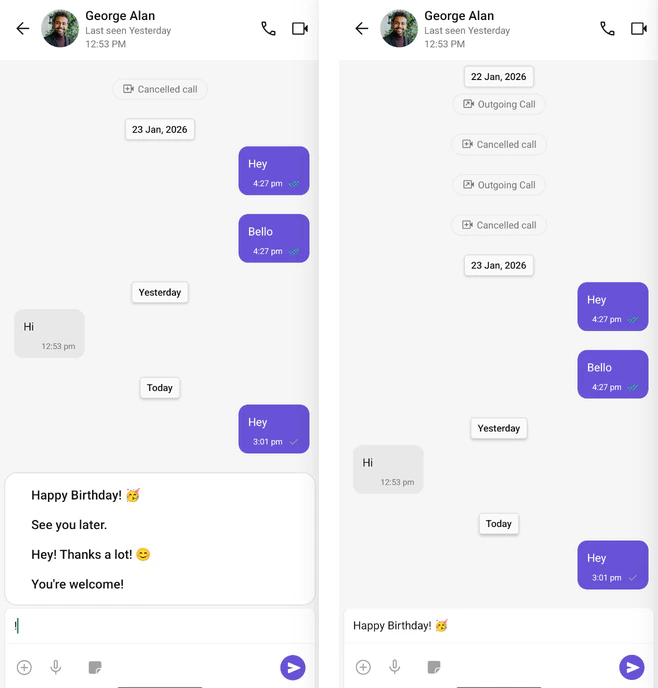
When users type the trigger character (!), they’ll see a list of available shortcuts to quickly insert predefined text.
Next Steps
Mentions Formatter Format and style @mentions in chat messages
Message Composer Customize the message input component
All Guides Browse all feature and formatter guides
Message List Customize how messages are displayed