Documentation Index Fetch the complete documentation index at: https://www.cometchat.com/docs/llms.txt
Use this file to discover all available pages before exploring further.
AI Integration Quick Reference
Field Value Package @cometchat/chat-uikit-reactFramework React.js Components CometChatConversations, CometChatMessageHeader, CometChatMessageList, CometChatMessageComposerLayout Two-panel — conversation list (left) + message view (right) Prerequisite Complete React.js Integration Steps 1–5 first Pattern WhatsApp Web, Slack, Microsoft Teams
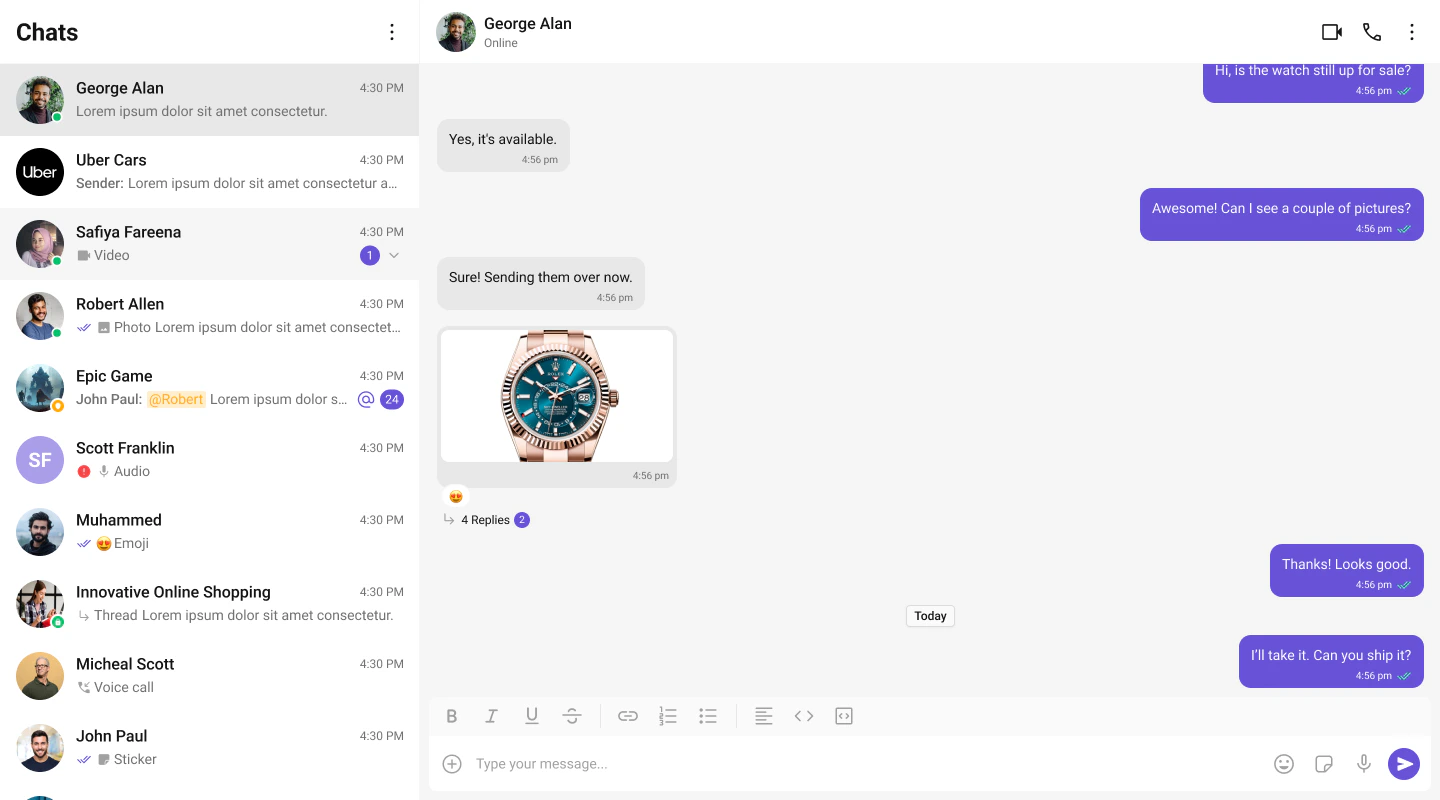
This guide builds a two-panel chat layout — conversation list on the left, messages on the right. Users tap a conversation to open it.
This assumes you’ve already completed React.js Integration (project created, UI Kit installed, init + login working, CSS imported).
Fork the sandbox, insert your CometChat credentials (App ID, Region, Auth Key), and preview the UI in real time.
What You’re Building
Three sections working together:
Sidebar (conversation list) — shows all active conversations (users and groups)
Message view — displays chat messages for the selected conversation in real time
Message composer — text input with support for media, emojis, and reactions
Create a CometChatSelector folder inside src/:
import { useEffect , useState } from "react" ;
import {
Conversation ,
Group ,
User ,
CometChat ,
} from "@cometchat/chat-sdk-javascript" ;
import {
CometChatConversations ,
CometChatUIKitLoginListener ,
} from "@cometchat/chat-uikit-react" ;
import "./CometChatSelector.css" ;
interface SelectorProps {
onSelectorItemClicked ?: (
input : User | Group | Conversation ,
type : string
) => void ;
}
export const CometChatSelector = ( props : SelectorProps ) => {
const { onSelectorItemClicked = () => {} } = props ;
const [ loggedInUser , setLoggedInUser ] = useState < CometChat . User | null >();
const [ activeItem , setActiveItem ] = useState <
CometChat . Conversation | CometChat . User | CometChat . Group | undefined
> ();
useEffect (() => {
const user = CometChatUIKitLoginListener . getLoggedInUser ();
setLoggedInUser ( user );
}, []);
return (
<>
{ loggedInUser && (
< CometChatConversations
activeConversation = {
activeItem instanceof CometChat . Conversation
? activeItem
: undefined
}
onItemClick = { ( e ) => {
setActiveItem ( e );
onSelectorItemClicked ( e , "updateSelectedItem" );
} }
/>
) }
</>
);
};
/* Menu icon in conversation header */
.selector-wrapper .cometchat-conversations .cometchat-list__header-menu .cometchat-button__icon {
background : var ( --cometchat-icon-color-primary );
}
.cometchat-conversations .cometchat-list__header-menu .cometchat-button__icon:hover {
background : var ( --cometchat-icon-color-highlight );
}
.cometchat-list__header-search-bar {
border-right : none ;
}
.cometchat .cometchat-menu-list__sub-menu-list-item {
text-align : left ;
}
.cometchat .cometchat-conversations .cometchat-menu-list__sub-menu-list {
width : 212 px ;
top : 40 px !important ;
left : 172 px !important ;
}
/* Logged-in user section */
#logged-in-user {
border-bottom : 2 px solid var ( --cometchat-border-color-default , #E8E8E8 );
}
#logged-in-user .cometchat-menu-list__sub-menu-item-title ,
#logged-in-user .cometchat-menu-list__sub-menu-list-item {
cursor : default ;
}
.cometchat-menu-list__sub-menu-list-item-icon-log-out {
background-color : var ( --cometchat-error-color , #F44649 );
}
.cometchat-menu-list__sub-menu-item-title-log-out {
color : var ( --cometchat-error-color , #F44649 );
}
.chat-menu .cometchat .cometchat-menu-list__sub-menu-item-title {
cursor : pointer ;
}
.chat-menu .cometchat .cometchat-menu-list__sub-menu {
box-shadow : none ;
}
.chat-menu .cometchat .cometchat-menu-list__sub-menu-icon {
background-color : var ( --cometchat-icon-color-primary , #141414 );
width : 24 px ;
height : 24 px ;
}
/* Selector container */
.cometchat-selector {
display : flex ;
width : 100 % ;
padding : 0 px 8 px ;
align-items : flex-start ;
gap : 8 px ;
border-top : 1 px solid var ( --cometchat-border-color-light , #F5F5F5 );
border-right : 1 px solid var ( --cometchat-border-color-light , #F5F5F5 );
background : var ( --cometchat-background-color-01 , #FFF );
}
.cometchat-selector__tab {
display : flex ;
padding : 12 px 0 px 10 px 0 px ;
flex-direction : column ;
justify-content : center ;
align-items : center ;
gap : 4 px ;
flex : 1 0 0 ;
min-height : 48 px ;
}
.cometchat-selector__tab-icon-active {
display : flex ;
width : 32 px ;
height : 32 px ;
justify-content : center ;
align-items : center ;
-webkit-mask-size : contain ;
mask-size : contain ;
cursor : default ;
background : var ( --cometchat-icon-color-highlight );
-webkit-mask : url ( './assets/chats.svg' ) no-repeat center ;
mask : url ( './assets/chats.svg' ) no-repeat center ;
}
.cometchat-selector__tab-text-active {
text-align : center ;
font : var ( --cometchat-font-caption1-medium , 500 12 px Roboto);
cursor : default ;
color : var ( --cometchat-text-color-highlight );
}
Key points about the sidebar:
CometChatUIKitLoginListener.getLoggedInUser() checks for an active session — the component only renders if a user is logged in.
activeConversation highlights the currently selected conversation in the list.
onItemClick fires when a user taps a conversation, passing the Conversation object to the parent.
Step 2 — Update App.tsx and App.css
Wire the sidebar and message components together in your main app file.
import { useState } from "react" ;
import {
CometChatMessageComposer ,
CometChatMessageHeader ,
CometChatMessageList ,
} from "@cometchat/chat-uikit-react" ;
import { CometChat } from "@cometchat/chat-sdk-javascript" ;
import { CometChatSelector } from "./CometChatSelector/CometChatSelector" ;
import "./App.css" ;
import "@cometchat/chat-uikit-react/css-variables.css" ;
function App () {
const [ selectedUser , setSelectedUser ] = useState <
CometChat . User | undefined
> ( undefined );
const [ selectedGroup , setSelectedGroup ] = useState <
CometChat . Group | undefined
> ( undefined );
return (
< div className = "conversations-with-messages" >
{ /* Sidebar — conversation list */ }
< div className = "conversations-wrapper" >
< CometChatSelector
onSelectorItemClicked = { ( activeItem ) => {
let item = activeItem ;
// Extract user/group from Conversation object
if ( activeItem instanceof CometChat . Conversation ) {
item = activeItem . getConversationWith ();
}
if ( item instanceof CometChat . User ) {
setSelectedUser ( item as CometChat . User );
setSelectedGroup ( undefined );
} else if ( item instanceof CometChat . Group ) {
setSelectedUser ( undefined );
setSelectedGroup ( item as CometChat . Group );
} else {
setSelectedUser ( undefined );
setSelectedGroup ( undefined );
}
} }
/>
</ div >
{ /* Message view — header + messages + composer */ }
{ selectedUser || selectedGroup ? (
< div className = "messages-wrapper" >
< CometChatMessageHeader user = { selectedUser } group = { selectedGroup } />
< CometChatMessageList user = { selectedUser } group = { selectedGroup } />
< CometChatMessageComposer
user = { selectedUser }
group = { selectedGroup }
/>
</ div >
) : (
< div className = "empty-conversation" >
Select a conversation to start chatting
</ div >
) }
</ div >
);
}
export default App ;
@import url ( "@cometchat/chat-uikit-react/css-variables.css" );
#root {
text-align : center ;
width : 100 vw ;
height : 100 vh ;
background-color : #282c34 ;
}
/* Two-panel layout */
.conversations-with-messages {
display : flex ;
height : 100 % ;
width : 100 % ;
flex-direction : row ;
}
/* Left panel — conversation list */
.conversations-wrapper {
height : 100 vh ;
width : 480 px ;
overflow : hidden ;
display : flex ;
flex-direction : column ;
}
.conversations-wrapper > .cometchat {
overflow : hidden ;
}
/* Right panel — messages */
.messages-wrapper {
width : 100 % ;
height : 100 % ;
display : flex ;
flex-direction : column ;
}
/* Empty state */
.empty-conversation {
height : 100 vh ;
width : 100 % ;
display : flex ;
justify-content : center ;
align-items : center ;
background : var ( --cometchat-background-color-03 , #F5F5F5 );
color : var ( --cometchat-text-color-secondary , #727272 );
font : var ( --cometchat-font-body-regular , 400 14 px Roboto);
}
.cometchat .cometchat-message-composer {
border-radius : 0 px ;
}
How it works:
When a conversation is tapped, onSelectorItemClicked extracts the User or Group from the Conversation object.
selectedUser / selectedGroup state drives which chat is displayed — pass either user or group to the message components, never both.
The empty state shows until a conversation is selected.
Step 3 — Run the Project
You should see the conversation list on the left. Tap any conversation to load messages on the right.
Next Steps
Theming Customize colors, fonts, and styles to match your brand
Components Overview Browse all prebuilt UI components
React.js Integration Back to the main setup guide
Core Features Chat features included out of the box