Documentation Index

Fetch the complete documentation index at: https://www.cometchat.com/docs/llms.txt

Use this file to discover all available pages before exploring further.

  • Requires: UNNotificationServiceExtension target in your app
  • Remove specific: UNUserNotificationCenter.current().removeDeliveredNotifications(withIdentifiers:)
  • Remove all: UNUserNotificationCenter.current().removeAllDeliveredNotifications()
  • Use case: Clear notifications when user reads message in-app
  • Related: Push Notifications · Increment Badge Count
This guide helps you remove delivered notifications using Notification Service Extension. For removing notifications you will need to add Notification Service in your project.

UNNotificationServiceExtension

This service grabs the data from the push notification payload, the user can modify its content and display the customized data on to the push notification.
If you already have Notification Service Extension then you can skip Step1.

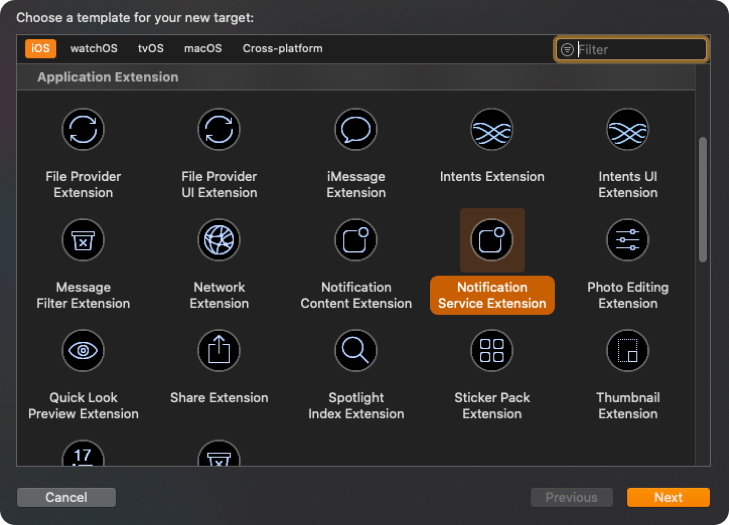
Step 1: Add UNNotificationServiceExtension inside the app.

  1. Click on File —> New —> Targets —> Application Extension —> Notification Service Extension.
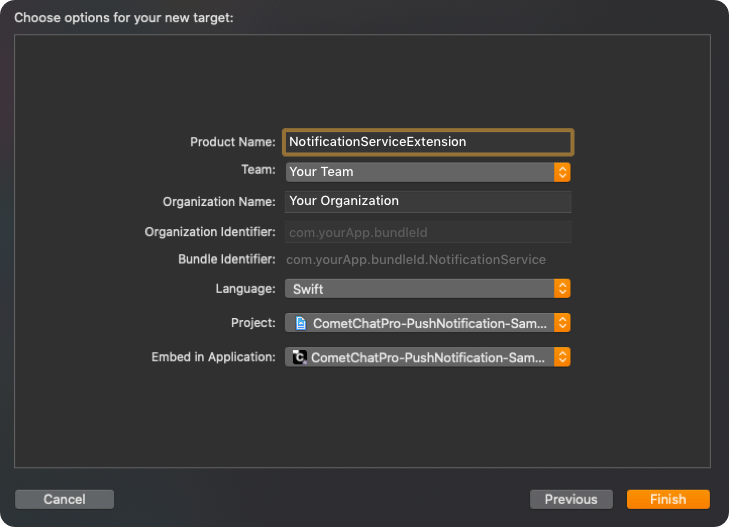
  1. Add Product Name and click on Finish.

Step 2: Add CometChat SDK in your Notification Extension.

Make sure you are adding the CometChat SDK in your Notification Extension. If you are using pods then your pod file should contain the following:
platform :ios, '11.0'
use_frameworks!

target 'MyApp' do
  pod 'CometChatSDK', '4.0.67'
end

target 'NotificationExtension' do
	pod 'CometChatSDK', '4.0.67'
end

Step 3: Add Code for removing Notifications.

Once you have configured the Notification Service, add the below code in didReceive(_:withContentHandler:) method under bestAttemptContent condition. The below code shows how you can remove the notifications for call type messages since we need to show the latest call notification.
import CometChatSDK

override func didReceive(_ request: UNNotificationRequest, withContentHandler contentHandler: @escaping (UNNotificationContent) -> Void) {

  self.contentHandler = contentHandler
  bestAttemptContent = (request.content.mutableCopy() as? UNMutableNotificationContent)

  if let bestAttemptContent = bestAttemptContent {
            __ Modify the notification content here...
  var customID : String = ""
  if let userInfo = request.content.userInfo as? [String : Any], let messageObject = userInfo["message"], let str = messageObject as? String, let dict = str.stringTodictionary() {
    if let baseMessage = CometChat.processMessage(dict).0 {
      switch baseMessage.messageCategory {
        case .message: break
        case .action: break
        case .call:
          if let call = baseMessage as? Call {
            customID = call.sessionID!
          }
        case .custom: break
        @unknown default: break
      }
    }
  }

  UNUserNotificationCenter.current().getDeliveredNotifications { notifications in
    var id : String = ""
    let matching = notifications.first(where: { notify in
      if let existingUserInfo = request.content.userInfo as? [String : Any], let messageObject = existingUserInfo["message"], let str = messageObject as? String, let dict = str.stringTodictionary() {
      if let baseMessage = CometChat.processMessage(dict).0 {
        switch baseMessage.messageCategory {
          case .message: break
          case .action: break
          case .call:
            if let call = baseMessage as? Call {
              id = call.sessionID!
            }

            case .custom: break
            @unknown default: break
            }
         }
       }
       return id == customID
      })

      if let matchExists = matching {
      UNUserNotificationCenter.current().removeDeliveredNotifications(
        withIdentifiers: [matchExists.request.identifier])
      }
  	}
	}
}
In the above code, we are removing the previous notification of the call message when the end call or unanswered call notification appears. We are removing the previous call notifications based on the call sessionID. You can change the implementation as per your service. Once you added the code, add the completion handler in the main thread:
DispatchQueue.main.asyncAfter(deadline: .now() + 0.2) {
	contentHandler(bestAttemptContent)
}

Next Steps

Push Notifications

Set up push notifications for your iOS app

Increment Badge Count

Update app icon badge from push notifications

Mark Delivered from Push

Mark messages as delivered via push notification

Background Updates

Keep real-time connection alive in background