

AI Integration Quick Reference
AI Integration Quick Reference
- On login: SDK automatically creates WebSocket connection
- On logout: SDK disconnects WebSocket
- Background: Connection maintained based on app settings
- Reconnection: Automatic reconnection on network recovery
- Related: Connection Status · Managing WebSocket Manually · Setup
Default SDK behaviour
When the login method of the SDK is called, the SDK performs the below operations:- Logs the user into the SDK
- Saves the details of the logged in user locally.
- Creates a web-socket connection for the logged in user.
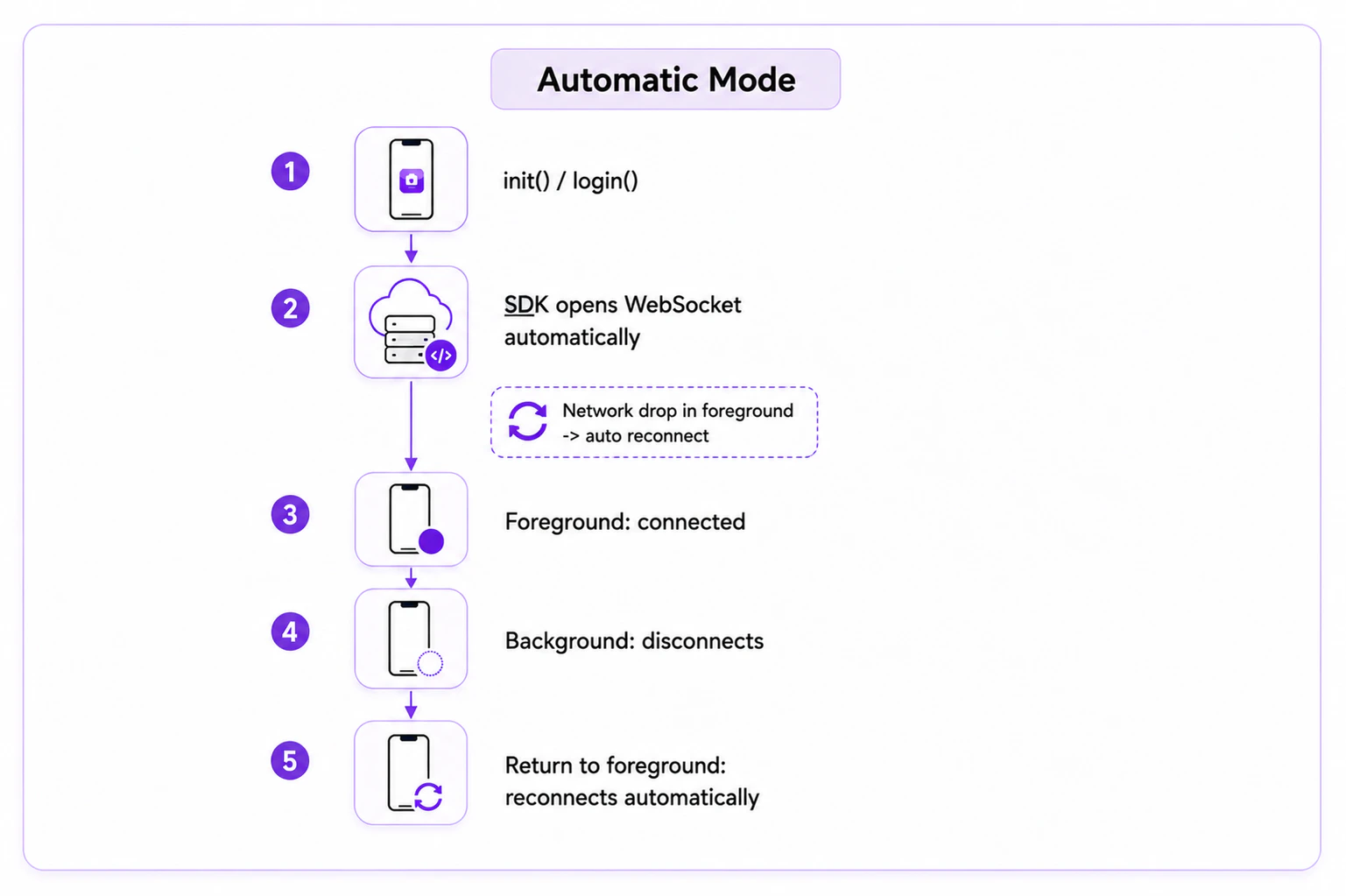
Auto Mode
CometChat SDK default connection behaviour is auto mode. The SDK automatically establishes and maintains the WebSocket connection. To enable auto mode, set theautoEstablishSocketConnection() method of AppSettings builder class to true. If you do not set this, the SDK will automatically apply auto mode as the default behaviour.
Reconnection
If the app is in the foreground and there is no internet connection, the SDK will handle the reconnection of the WebSocket in auto mode.Manual Mode SDK behaviour
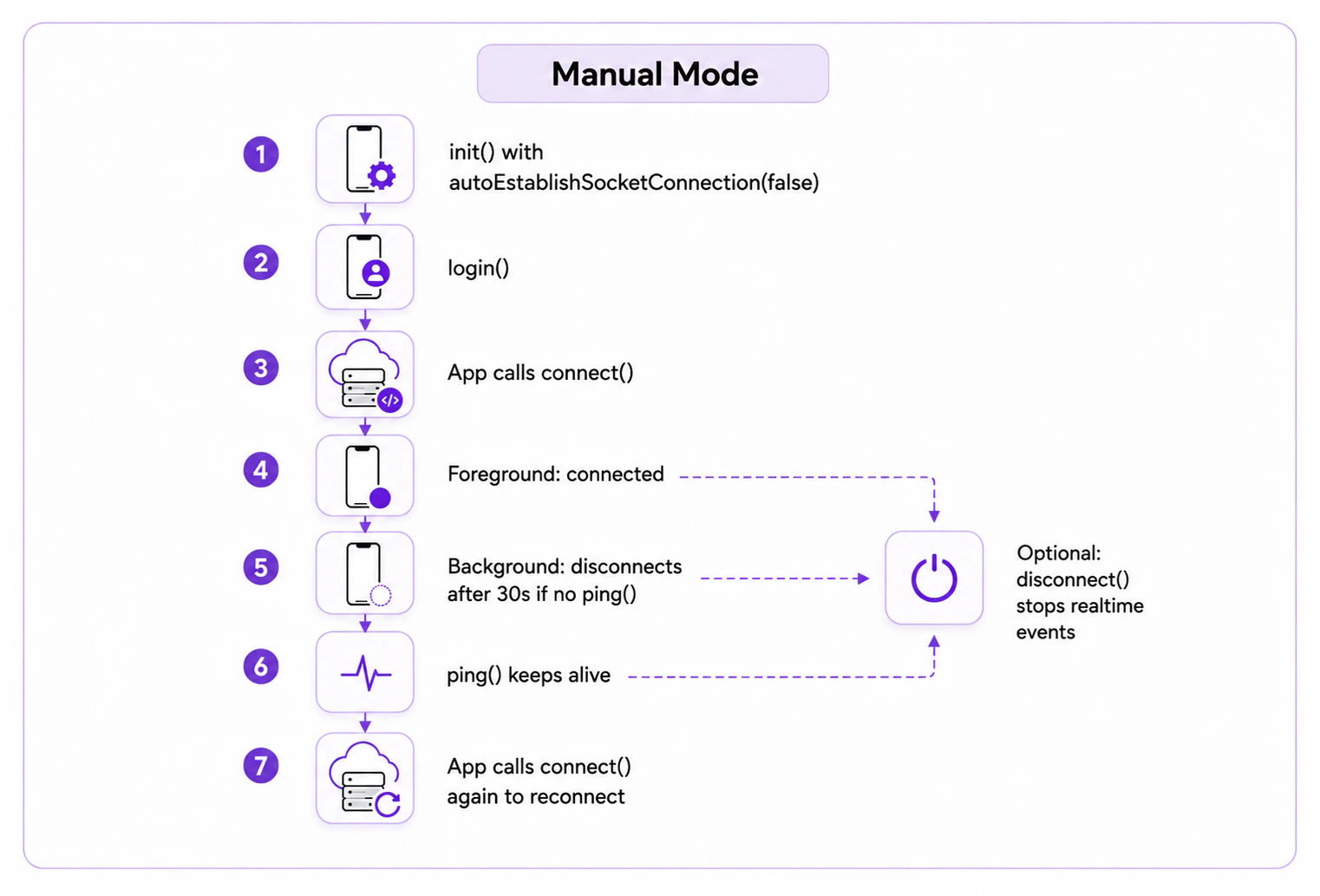
In manual mode, you explicitly establish and disconnect the WebSocket connection. SetautoEstablishSocketConnection() to false and then call CometChat.connect() to establish the connection and CometChat.disconnect() to disconnect.
Manual mode provides an advantage of being connected to the web-sockets even if the app is in background. This needs to be handled by the user with the help of the ping() function.
By default, if manual mode is activated, the SDK will disconnect the WebSocket connection after 30 seconds if the app goes into the background.
To keep the WebSocket connection alive in the background, call the CometChat.ping() method from your app within 30 seconds. Continue calling CometChat.ping() every 30 seconds as long as you need the web-sockets connected.
If you do not call CometChat.ping() within 30 seconds, the SDK will disconnect the WebSocket connection.
Managing Manually
Enable Manual Mode
While calling the init() function on the app startup, use theautoEstablishSocketConnection() method provided by the AppSettingsBuilder class. If set to true, the SDK manages the web-socket connection internally. If set to false, you handle it manually:
- Swift
connect(), disconnect() and ping() methods provided by the SDK.
Connect to the web-socket server
Use theconnect() method provided by the CometChat class to establish the connection. Make sure the user is logged in before calling this method (CometChat.getLoggedInUser()). Once connected, you will start receiving all real-time events.
- Swift
Disconnect from the web-socket server
Use thedisconnect() method to break the established connection. Once disconnected, you will stop receiving all real-time events.
- Swift
Maintain long-standing background connection
You can maintain a long-standing background connection by calling theCometChat.ping() method every 30 seconds after your app enters the background or after the previous ping() call.
- Swift
Reconnection
If manual mode is enabled and the app is in the foreground, the SDK will automatically reconnect the WebSocket if the internet connection is lost. However, if the app is in the background and the WebSocket is disconnected or you calledCometChat.disconnect(), then you will need to call CometChat.connect() to create a new WebSocket connection.
Common Error Codes
Next Steps
Connection Status
Monitor the SDK connection state in real time
Managing WebSocket Manually
Take full control of WebSocket connections
All Real-Time Delegates
Complete reference for all SDK event delegates
Background Updates
Keep real-time connection alive in background